
Upload a photo
PNG, JPG or WebP · up to 10 MB
Choose a photo to generate a video.
One apple, one reach, one surprised look
Make a Monkey Eating Apple AI video from one clear portrait. Animate a cheeky apple grab and a surprised reaction in a short, playful scene using ReelAI.
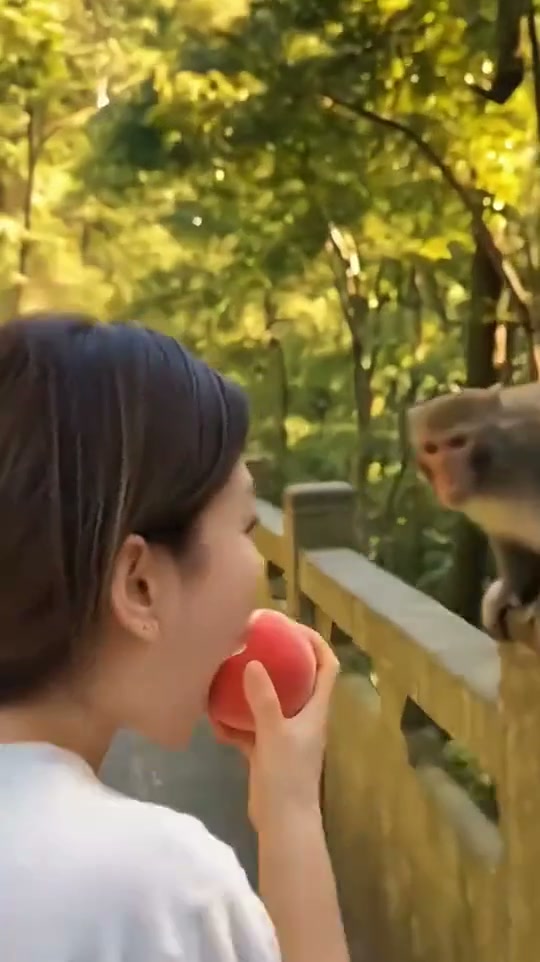
The Monkey Eating Apple scene is built around an abrupt change of ownership: someone holds a red apple, a macaque reaches for it and the person looks down in disbelief. The reference shows a woman beside a stone railing in a wooded setting while a monkey pulls at the fruit. A nearby second monkey appears in part of the clip. Our direction simplifies that busy encounter to one person, one monkey and one apple in a stable shot. Start with a photo showing your face and upper body; the prompt introduces the woodland setting and the cheeky animal. A gentle reach followed by a delayed surprised look gives the joke its shape without a chase or a fight.
Best for
- Animal reaction clips
- comic travel scenes
- surprise apple-grab memes
Animate the apple-grab moment
Choose your photo
Choose one sharp upper-body portrait with your face and hands visible, leaving space beside you for the monkey. Holding an apple in the input can help establish the prop, but it is not required. A complete person-and-monkey scene is also a useful option.
Generate with the template
Add your portrait, leave space around the hands and generate the short apple-grab interaction.
Review and download
Follow the apple from the person's hand to the monkey. It should stay one object with a clear path. Check that fingers and paws do not merge, the person keeps the same face and the reaction remains readable after the reach.
Keep the fruit handoff clear
Use this reference direction as a starting point in custom-prompt mode. The template runs fixed instructions; remixing is a separate workflow, not an edit to the preset.
Create a lighthearted woodland apple scene using the person in the uploaded photo. Preserve their recognizable face, hair and clothing. Frame them beside a stone railing holding one red apple, with one small macaque beside them. The monkey gently reaches for the apple and draws it toward its chest while the person releases it, pauses and looks surprised. Keep the same fruit visible throughout and the handoff slow and clear. Fixed medium camera, distinct fingers and paws, natural proportions. No chasing, aggressive contact, extra monkeys, duplicated fruit, cuts, captions or logos.
Before you create
Will this recreate the exact monkey video from my selfie?
Use one clear portrait as the starting identity. The prompt introduces the apple-and-monkey scene and guides a fresh interpretation of the grab. The preview is a third-party reference, not a ReelAI result from your photo. It does not imply frame-by-frame copying, the original audio or a guarantee of the same animal behavior.
Can I change the creative direction?
The preset uses fixed instructions. Copy the reference direction into custom-prompt mode to adapt it; this does not change the preset itself.
What video output should I expect?
The default length is 9s (reference ratio 540/962). The output follows your uploaded photo's aspect ratio and suits Animal reaction clips, comic travel scenes, surprise apple-grab memes.
Create a cheeky apple-stealing scene
Choose a clear portrait and let a small unexpected reach deliver the punchline.