
Upload a photo
PNG, JPG or WebP · up to 10 MB
Choose a photo to generate a video.
A snowy cartoon on a red doghouse
Create a Charlie Brown Christmas AI cartoon video from one photo. Build a snowy red-doghouse scene with a familiar face, soft flakes and a gentle holiday pose.
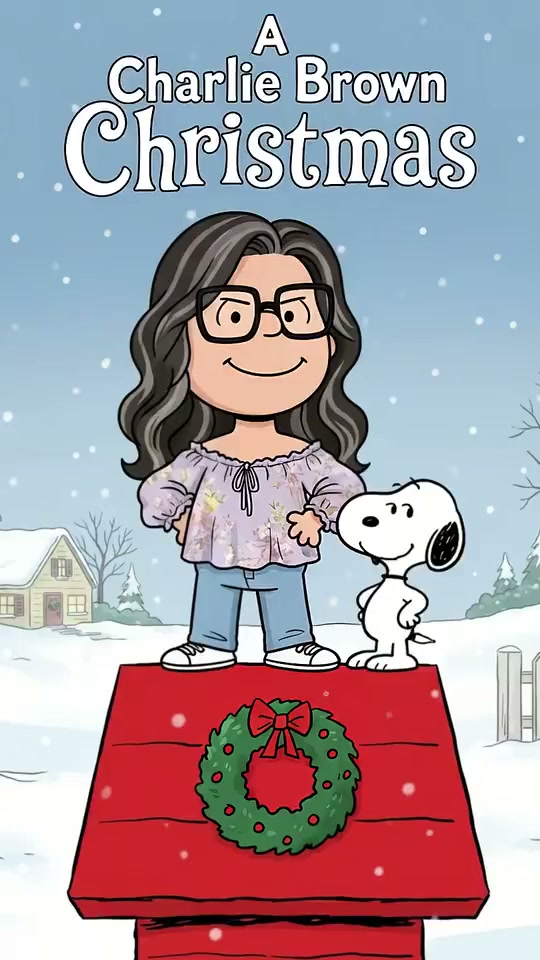
Charlie Brown Christmas brings a familiar portrait into a flat, hand-drawn winter scene. The reference holds on a glasses-wearing cartoon woman and a small white beagle standing on a bright red doghouse, with a wreath on the roof and a pale-blue snowy neighborhood behind them. Hair, glasses and clothing give the illustrated subject a recognizable silhouette. The preview shows the completed artwork rather than a full photo-to-cartoon scan, so use it to judge the composition, line work and holiday color palette. Your uploaded image provides the appearance for a fresh interpretation of that scene.
Best for
- Choose this direction for a personal holiday greeting
- a winter profile reel or a simple illustrated family moment. A calm pose keeps the cartoon face readable and lets the red roof
- green wreath and snow carry the seasonal setting. It suits a gentle greeting more than a fast dance or a scene with several camera cuts.
Create your Charlie Brown Christmas greeting
Choose your photo
Use one clear waist-up or full-body image with hair, glasses and outfit details visible. A single subject is easiest to read; if you want a family scene, everyone should already appear together in the same photo. An already-illustrated input can keep the initial composition closer to the reference. Leave space around the head and avoid hands covering the face.
Generate with the template
Keep the red doghouse, snowy yard and gentle illustrated pose, or refine the winter colors before generating.
Review and download
Check the glasses, hair outline and hands first, then inspect the beagle, roof edges and wreath. The background should remain simple while the face stays consistent. The reference contains a large holiday title, but generated lettering is not the focus of this direction; add any exact greeting after reviewing the visual clip.
Guide the flat cartoon and winter setting
Use this reference direction as a starting point in custom-prompt mode. The template runs fixed instructions; remixing is a separate workflow, not an edit to the preset.
Create a Charlie Brown Christmas-inspired winter cartoon video using the person or people in the single uploaded image. Preserve recognizable hair, glasses, facial proportions and outfit colors while rendering simple flat 1960s-style cartoon shapes with clean dark outlines. Arrange the subject beside a small white cartoon beagle on a broad red wooden doghouse roof with a green holiday wreath. Keep a pale-blue sky, snowy neighborhood and simple fence behind them. Hold a steady medium-wide camera as the subject makes a small warm smile and gentle greeting gesture, with light snow drifting through the scene. Keep the roof, glasses, hands and character count stable. If the uploaded image is already illustrated, retain its existing composition. No added lettering, captions, logos, camera cuts or copied soundtrack.
Before you create
Will the video reproduce the reference title and scan transition?
The preset provides a snowy cartoon creative direction, not a frame-by-frame copy of the reference. The bound preview shows the finished scene. Use a prepared illustrated image when that composition matters, and add exact words separately rather than relying on newly generated lettering.
Can I change the creative direction?
The preset uses fixed instructions. Copy the reference direction into custom-prompt mode to adapt it; this does not change the preset itself.
What video output should I expect?
The default length is 8s (reference ratio 540/960). The output follows your uploaded photo's aspect ratio and suits Choose this direction for a personal holiday greeting, a winter profile reel or a simple illustrated family moment. A calm pose keeps the cartoon face readable and lets the red roof, green wreath and snow carry the seasonal setting. It suits a gentle greeting more than a fast dance or a scene with several camera cuts..
Make your Charlie Brown Christmas clip
Start with one clear portrait or illustrated scene for a personal, softly animated Christmas greeting.