
Upload a photo
PNG, JPG or WebP · up to 10 MB
Choose a photo to generate a video.
A platform pose interrupted by departure
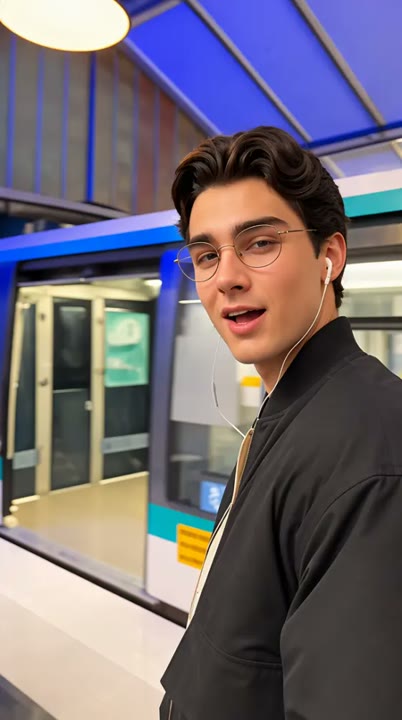
Create a Phone on Train AI video from one standing photo. Pose on a Paris-inspired platform, react as the view drifts away and make your own metro-window meme.
The Phone on Train effect captures the awkward moment when a posed platform performance meets a departing viewpoint. The camera stays inside a train window while your subject notices the movement and takes a small surprised step. Soft station lights and the sliding platform establish a Paris-inspired metro mood without several location changes. This single-photo version avoids an exterior-phone stunt, a long chase and a separate Eiffel Tower finale. It gives the joke one clear window-framed action. Use it for a missed-departure reaction, a travel meme or a short character moment with a moving background.
Best for
- Missed-departure reactions
- metro travel memes
- window-framed character clips
Create your Phone on Train reaction
Choose your photo
Choose one standing person with a clear face, visible shoes and enough room around the body for a small step. A prepared platform portrait can establish the setting, but avoid signs or crowds obscuring the featured subject.
Generate with the template
Add your standing photo and generate the platform scene. The effect keeps the viewpoint inside a train window, then guides a small surprised step as the station begins drifting past the camera.
Review and download
Check that the camera remains inside the same window and the subject stays on the platform. The small step should remain grounded as the background drifts, with the face and clothing visible rather than stretched by motion.
Keep the viewpoint inside one train window
Use this reference direction as a starting point in custom-prompt mode. The template runs fixed instructions; remixing is a separate workflow, not an edit to the preset.
Create a fictional metro-platform moment with the single person in the uploaded photo. Preserve their face, hairstyle, outfit and proportions. Keep the camera just inside a train window, looking outward at the subject on a Paris-inspired platform. They pose toward the lens, notice the train starting to move and take one small surprised step as the platform drifts slowly past. Use a continuous window-framed view with soft station lights and a clear face. Keep the subject on the platform. No exterior phone stunt, long chase, extra featured people, readable station signs, captions or rapid cuts.
Before you create
Does Phone on Train recreate the complete chase and Eiffel Tower ending?
Phone on Train here creates a shorter window-framed platform reaction from one photo. It does not reproduce an exterior-phone setup, a long running sequence or the reference's separate city finale. The moving viewpoint and surprised step provide a self-contained travel joke that you can place inside your own larger edit.
Can I change the creative direction?
The preset uses fixed instructions. Copy the reference direction into custom-prompt mode to adapt it; this does not change the preset itself.
What video output should I expect?
The default length is 12s (reference ratio 406/720). The output follows your uploaded photo's aspect ratio and suits Missed-departure reactions, metro travel memes, window-framed character clips.
Make your own awkward metro moment
Choose a clear standing portrait and create your metro-window reaction. Review the feet and window framing, then download the take with the clearest moment of surprise.