
Upload a photo
PNG, JPG or WebP · up to 10 MB
Choose a photo to generate a video.
Your pet runs the lift lobby
Create a Dog Elevator Prank video from one prepared scene photo. Give your upright pet a cheeky lift-side nudge, a surprised companion and a comic exit.
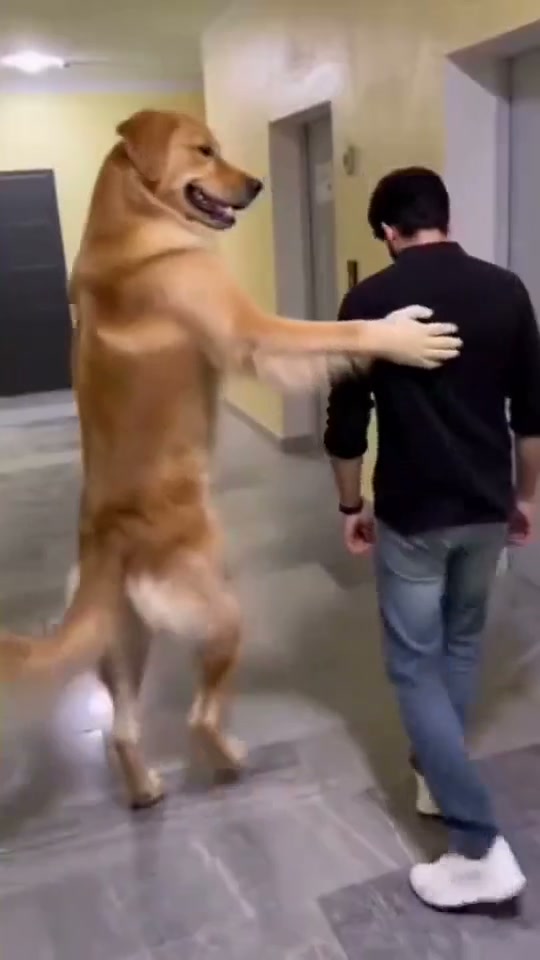
An upright pet takes charge of the lift lobby. The reference follows a human-sized golden dog and a man beside steel elevator doors, ending with the man seated inside and his shoes nearby. ReelAI shortens that long prank into one readable moment: a paw reaches toward the call button, the companion steps toward the open lift after a playful nudge, and the pet gives the camera a satisfied look. Start from a scene image that already establishes both roles.
Best for
- A pet-with-attitude meme or an unexpected role reversal in an ordinary apartment lobby. The joke works when the animal looks confident and the human reaction stays simple. Keep the elevator opening and the space between the two figures visible instead of crowding the scene with extra people or props.
Make a lift-side pet prank
Choose your photo
Prepare one image containing your pet and a person beside an open elevator. Show the pet's whole body, the person's face and both feet, with clear space at the doorway. Use that finished composition as the single upload. Separate portraits cannot be assigned to the two roles in this preset.
Generate with the template
Use the prepared pet-and-person composition, keep the lift open and limit the prank to one small nudge and reaction.
Review and download
Watch the paw-to-button contact, the companion's step and the gap between both bodies. Doors, floor tiles and call-panel placement should stay fixed. The pet should retain animal paws and its own coat pattern, while the person remains recognizable during the surprised turn.
Elevator role-reversal direction
Use this reference direction as a starting point in custom-prompt mode. The template runs fixed instructions; remixing is a separate workflow, not an edit to the preset.
Animate the supplied prepared scene of one pet and one person beside an open elevator. Preserve both subjects' recognizable appearances, clothing or fur, and the existing lobby layout. Keep the animal upright in a deliberately fictional pose with its own muzzle, ears and natural paws. Begin with the pet making one small reach toward the call button. Give the companion a light comic nudge from a paw at the shoulder or upper arm, followed by one surprised step into the open elevator and a turn back toward the pet. The pet pauses and looks toward the camera. Keep both figures separated, feet grounded and the doorway fully open. Use a fixed medium-wide camera and stable lighting. No hard fall, shoe-throwing chain, injury, human hands on the animal, extra characters or scene cuts.
Before you create
Will it recreate every move in the original elevator prank?
This version focuses on the lift-side setup, one playful nudge and a short reaction. The longer reference also includes shoe handling and several body movements. A prepared shared image and a compact action give the scene a clearer starting point than asking for the whole sequence in one short generation.
Can I change the creative direction?
The preset uses fixed instructions. Copy the reference direction into custom-prompt mode to adapt it; this does not change the preset itself.
What video output should I expect?
The default length is 12s (reference ratio 540/960). The output follows your uploaded photo's aspect ratio and suits A pet-with-attitude meme or an unexpected role reversal in an ordinary apartment lobby. The joke works when the animal looks confident and the human reaction stays simple. Keep the elevator opening and the space between the two figures visible instead of crowding the scene with extra people or props..
Put your pet in charge of the elevator
Start with a clear shared lobby image and turn an ordinary elevator wait into a short pet-led comedy scene.