
Upload a photo
PNG, JPG or WebP · up to 10 MB
Choose a photo to generate a video.
Let the ears follow the rhythm
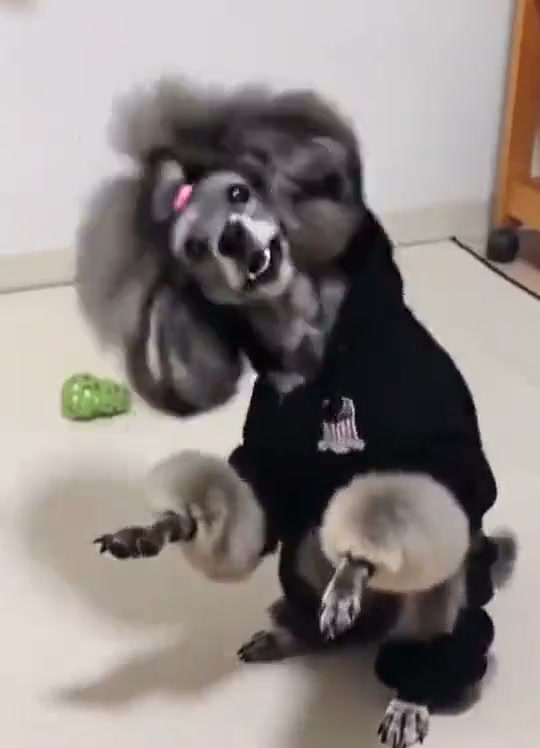
Turn one pet photo into a Pet Rock Dance AI video with a dark hoodie, head nods and bouncy ears. Keep familiar markings visible through a short close-up groove.
Pet Rock Dance lets the ears and head movement carry a compact hoodie performance. The reference follows a grey poodle-like dog on a tiled floor, with bent forepaws, flying ear fur and a closer final look. Your interpretation keeps a small head-nod rhythm, one paw lift and enough framing to preserve the pet's recognizable features.
Best for
- An expressive pet portrait
- especially when ears
- curls or distinct facial markings make small movements easy to notice. The scene can stay indoors with a quiet background.
Prepare your pet's close-up groove
Choose your photo
Choose one well-lit whole-pet photo with ears and forepaws visible. A prepared dark-hoodie image sets the outfit most clearly; leave space above the head and avoid accessories covering the eyes.
Generate with the template
Keep the motion modest: a few head nods, a shoulder bounce and one small paw lift.
Review and download
Inspect the ear shape, muzzle and fur pattern during each nod. The hoodie should stay separate from the paws, and the closer ending should not crop away the entire face or add extra limbs.
Small nods and a single paw lift
Use this reference direction as a starting point in custom-prompt mode. The template runs fixed instructions; remixing is a separate workflow, not an edit to the preset.
Animate the single pet in the uploaded image, preserving its recognizable muzzle, eye placement, ears, coat pattern and natural proportions. Keep a simple dark hoodie around the body with the face and forepaws visible. Use a steady indoor medium view. The pet makes two small head nods and a gentle shoulder bounce, lifts one forepaw slightly, then leans toward the camera for a closer curious look. Let ear fur move naturally without changing its length or shape. Keep the floor stable and paws distinct. No jumps, extra limbs, human hands, new animals, captions or cuts.
Before you create
Does my pet need to be wearing a hoodie in the photo?
A prepared hoodie portrait gives the scene a clear starting outfit. You can also describe a simple dark hoodie around the pet, but keep its face, ears and paws unobstructed so the small dance remains recognizable.
Can I change the creative direction?
The preset uses fixed instructions. Copy the reference direction into custom-prompt mode to adapt it; this does not change the preset itself.
What video output should I expect?
The default length is 10s (reference ratio 540/748). The output follows your uploaded photo's aspect ratio and suits An expressive pet portrait, especially when ears, curls or distinct facial markings make small movements easy to notice. The scene can stay indoors with a quiet background..
Give your pet a hoodie groove
Use a clear pet portrait with visible ears and enough room for the head movement.