
Upload a photo
PNG, JPG or WebP · up to 10 MB
Choose a photo to generate a video.
A nighttime toast with a monochrome finish
Create a Champagne Birthday AI video from a prepared celebration photo. Raise the bottles, add a short foam spray and finish in black and white with ReelAI.
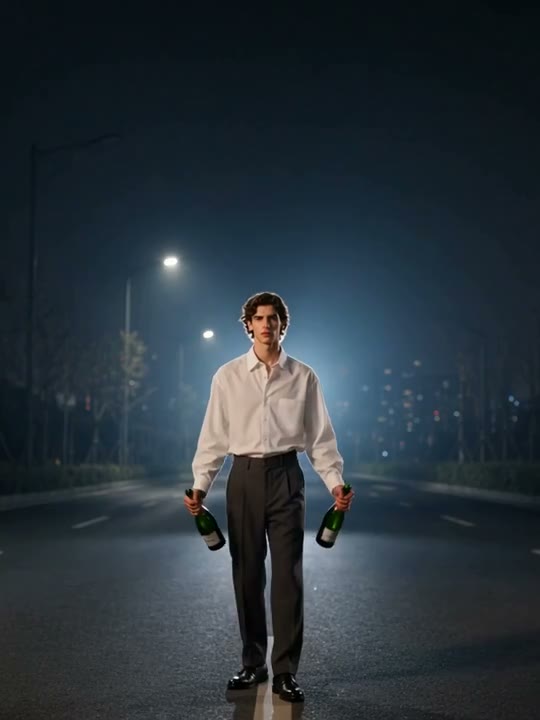
Champagne Birthday turns the pause before a toast into a short celebration scene. This direction follows the nighttime-road variation: one adult, two bottles, distant street lights and a gradual black-and-white finish. Start with those elements already visible in your image so the animation can concentrate on raised arms, foam and expression. The reference also includes walking, a turn and birthday lettering; this preset keeps a smaller standing celebration instead of reproducing that complete edit. It suits a personal birthday post or a short insert in a longer celebration video.
Best for
- Birthday Reels
- nighttime toast portraits
- monochrome celebration inserts
Make your Champagne Birthday video
Choose your photo
Upload one prepared full-body image of an adult standing on an empty road or terrace at night, with one bottle already visible in each hand. Keep both hands, the bottle openings and clear space overhead in frame. A close-up selfie alone does not establish this scene.
Generate with the template
Upload your prepared celebration scene and select Generate video. The direction focuses on a small arm lift, brief foam spray and a soft change to black and white, keeping the face and bottles in view.
Review and download
Check that both bottles remain attached to the correct hands as the arms rise. Foam should emerge from the bottle openings without hiding the face, and the monochrome transition should affect the whole scene evenly. Check the background for unexpected people or vehicles.
Raised bottles, a short spray and a final smile
Use this reference direction as a starting point in custom-prompt mode. The template runs fixed instructions; remixing is a separate workflow, not an edit to the preset.
Animate the single adult already standing on the empty nighttime road in the supplied image, holding one champagne bottle in each hand. Preserve their face, hairstyle, shirt, trousers, body proportions, both bottles and the distant street lights. Use a steady full-body camera with open space above the shoulders. The person turns a little toward the camera and raises both arms into a relaxed celebratory pose. Let two brief sprays of foam emerge upward from the bottle openings, away from the face, then soften the entire image into black and white as the subject smiles. Keep the bottle count at two and the road empty. Use one continuous shot, natural hands and restrained movement. No arriving vehicles, new people, changing clothes, generated lettering, birthday numbers, logos or rapid cuts.
Before you create
Does Champagne Birthday add a name, age or birthday caption?
This direction leaves generated lettering out. Add your name, age or birthday message in an editor after downloading the take you prefer. The source preview contains a birthday caption, but it is a reference rather than an exact output template. Your image provides the person, bottles and setting; ReelAI animates that prepared scene.
Can I change the creative direction?
The preset uses fixed instructions. Copy the reference direction into custom-prompt mode to adapt it; this does not change the preset itself.
What video output should I expect?
The default length is 5s (reference ratio 540/720). The output follows your uploaded photo's aspect ratio and suits Birthday Reels, nighttime toast portraits, monochrome celebration inserts.
Give your birthday photo a celebratory finish
Start with the bottles and nighttime setting already in your photo. Review hands, foam and expression, download your preferred take, then add your own birthday message.