
Upload a photo
PNG, JPG or WebP · up to 10 MB
Choose a photo to generate a video.
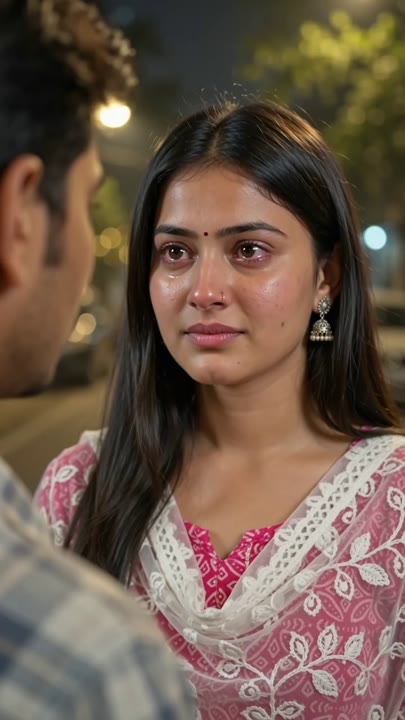
An upset expression with a defiant finish
Create a Middle Finger Cry Filter AI video from one portrait. Explore watery eyes, a defiant gesture, and an evening-street reaction, then review it on ReelAI.
Middle Finger Cry Filter combines two opposing reactions: the face looks upset while a raised hand refuses to stay polite. This preset keeps the scene waist-up and the background quiet, giving the tears and hand shape room to read. It asks for a small turn away rather than a long walk through changing camera angles. A clear adult portrait provides the starting appearance; the model builds the evening-street atmosphere and movement around it. Use the clip for an exaggerated breakup joke, a fictional character response, or an expressive reaction insert with your own caption.
Best for
- Exaggerated breakup jokes
- Character reaction edits
- Defiant mood captions
Create a Middle Finger Cry Filter reaction
Choose your photo
Choose a waist-up adult portrait with clear eyes and one hand visible away from the face. Avoid rings or gloves that hide finger shapes. Leave space beside the head for the raised gesture and use even facial lighting.
Generate with the template
Generate one reaction clip with this direction selected. It keeps the camera waist-up and limits the action to a small facial change, one raised-hand gesture, and a partial turn away from the lens.
Review and download
Inspect the raised hand carefully for the number and shape of fingers. Watch the eyes and mouth during the turn, checking that tears do not distort the face. Select a brief readable gesture if the longer movement becomes inconsistent.
Direct the tears and raised-hand gesture
Use this reference direction as a starting point in custom-prompt mode. The template runs fixed instructions; remixing is a separate workflow, not an edit to the preset.
Animate the single adult subject from the uploaded portrait in a dramatic, fictional evening-street reaction. Preserve the face, hairstyle, and clothing. Begin with watery eyes, a trembling lower lip, and a small breath. Let one hand rise clearly beside the face with the middle finger extended and the remaining fingers folded, then lower it as the subject turns partly away. Use a stable waist-up camera, soft street lighting, and a quiet blurred background. Keep the gesture readable, the movement restrained, and the scene free of captions or additional visible faces.
Before you create
What should I check in a Middle Finger Cry Filter result?
Start with the hand, since a folded-finger gesture can be difficult for a video model to maintain. Then review the eyes, mouth, and face shape during the turn. The preset creates an exaggerated reaction from one photo, so choose the clearest short passage rather than assuming every frame will be equally usable.
Can I change the creative direction?
The preset uses fixed instructions. Copy the reference direction into custom-prompt mode to adapt it; this does not change the preset itself.
What video output should I expect?
The default length is 10s (reference ratio 406/720). The output follows your uploaded photo's aspect ratio and suits Exaggerated breakup jokes, Character reaction edits, Defiant mood captions.
Give your portrait an expressive response
Choose a clear adult portrait and explore an exaggerated emotional reaction, with a quiet street setting leaving the face and hand gesture as the focus.