
Upload a photo
PNG, JPG or WebP · up to 10 MB
Choose a photo to generate a video.
Are You Hungry: one photo with a clear visual punchline
Upload one photo for Are You Hungry: animate a cartoon pan-holding paw and a curious kitchen head tilt in a 12-second clip. Serve a playful dinner invitation.
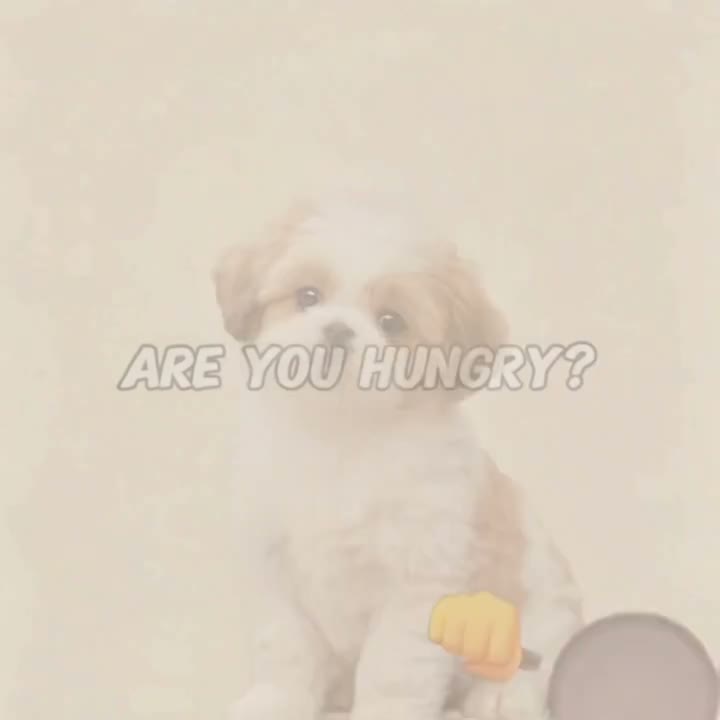
Are You Hungry turns a still image into a short scene built around a cartoon pan-holding paw and a curious kitchen head tilt. A small brown-and-white puppy appears on a plain background with ARE YOU HUNGRY? lettering, a frying pan and a yellow cartoon hand. The middle and final samples place the puppy in a warm illustrated kitchen beside a pan over a burner, with the layout mirrored between samples. The source is a square composited meme with caption, cartoon hand and background replacement rather than naturalistic cooking; adaptation emphasizes the pet and pan gag without relying on generated lettering. For this I Can Cook version, the uploaded picture anchors one continuous animation: the movement develops within a single composition instead of reproducing every source frame. Choose a starting image that already establishes the setting so the result feels connected from opening pose to final reaction.
Best for
- Are You Hungry suits pet account posts
- dinner invitation jokes and cozy cooking memes. Choose a picture with a readable silhouette and let the movement carry the idea before adding a caption in your posting editor.
Make your I Can Cook clip in three steps
Choose your photo
One clearly isolated front-facing pet with its face and body visible; leave space beside the pet for a pan and kitchen props. For Are You Hungry, choose even lighting and avoid cropped wrists or hidden feet when they are part of the action. Leave breathing room in the direction of movement. A prepared composition gives the animation more useful detail than a tightly cropped face alone.
Generate with the template
Select Are You Hungry and review the motion direction before generating. Keep the pet centered while a cartoon paw gently lifts a frying pan beside its body. Add a curious head tilt and a tiny pan wobble in one warm kitchen composition. Keep the main action simple enough to read on a phone screen; a clean opening pose and recognizable finish make I Can Cook easier to follow.
Review and download
Watch your I Can Cook result once at normal speed, then pause at the busiest moment. Check the face, moving limbs and nearby object edges for continuity. Prefer a readable gesture over excessive blur. Keep the take where the background stays steady and the final expression remains recognizable, then trim your posting caption around that moment.
Direct the Are You Hungry movement
Use this reference direction as a starting point in custom-prompt mode. The template runs fixed instructions; remixing is a separate workflow, not an edit to the preset.
Animate the uploaded image as a Are You Hungry scene in one continuous 12-second shot. Keep the pet centered while a cartoon paw gently lifts a frying pan beside its body. Add a curious head tilt and a tiny pan wobble in one warm kitchen composition. Preserve the recognizable face or coat markings, outfit details and original proportions. Keep surrounding objects stable and give each gesture a clear beginning and finish. Use measured motion rather than rapid cuts. Maintain distinct limbs and clean edges around the moving subject. Do not add extra performers, text overlays or a new camera angle. Build the action around the available space in the starting composition.
Before you create
Does Are You Hungry include the I Can Cook lettering?
This version concentrates on the pet, pan and expression. Add the Are You Hungry or I Can Cook caption afterward for clean lettering and control over placement; the animation does not depend on text appearing inside the scene. The I Can Cook prompt guides a short visual interpretation from one image, not an exact replay of the source. Keep the first-frame setup close to the intended action for a more coherent result.
Can I change the creative direction?
The preset uses fixed instructions. Copy the reference direction into custom-prompt mode to adapt it; this does not change the preset itself.
What video output should I expect?
The default length is 12s (reference ratio 720/720). The output follows your uploaded photo's aspect ratio and suits Are You Hungry suits pet account posts, dinner invitation jokes and cozy cooking memes. Choose a picture with a readable silhouette and let the movement carry the idea before adding a caption in your posting editor..
Create your Are You Hungry clip
Choose a clear starting image and turn a cartoon pan-holding paw and a curious kitchen head tilt into your next I Can Cook post.