
Upload a photo
PNG, JPG or WebP · up to 10 MB
Choose a photo to generate a video.
One small jump, one muddy splash
Make a Teletubbies AI video from one photo. Put your face in a plush costume, hop toward a muddy trench and turn a clumsy splash into your own meme on ReelAI.
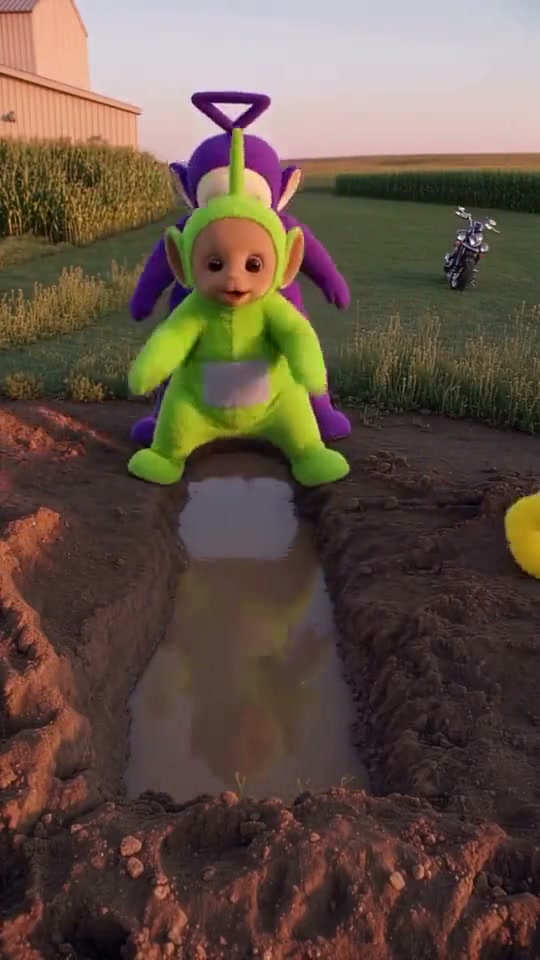
A confident little jump ends in an oversized muddy splash. The inspiration shows colorful plush-costumed characters crossing a farm trench, with the green character landing short while the others continue past. Your version uses one face as the lead in a green, rounded costume and simplifies the action to a hop, a soft fall and a surprised look. The farmland, puddle and supporting figures establish the joke without requiring you to supply a whole cast.
Best for
- A playful clumsy-friend reaction
- a weekend-outing joke or a plush-character version of an everyday mistake. Keep the muddy trench as the main obstacle and give the lead enough room to land. The effect reads through the costume
- the tiny jump and the splash rather than a long story.
Make your plush-character mud fall
Choose your photo
Upload one clear front-facing or slightly angled portrait with the face unobstructed. A waist-up photo helps keep the lead's proportions consistent when the costume is introduced. You can also start with one prepared plush-costume scene if you want firmer control over the field, puddle and character placement.
Generate with the template
Keep one green-costumed lead, a shallow muddy trench and a clear landing area so the small fall stays easy to follow.
Review and download
Check the face inside the costume opening, the shape of the arms and the landing point. The lead should remain visible through the splash, with the trench edges staying fixed. Watch that supporting figures keep their distance instead of merging with the falling character.
Muddy trench direction
Use this reference direction as a starting point in custom-prompt mode. The template runs fixed instructions; remixing is a separate workflow, not an edit to the preset.
Use the uploaded portrait to keep one lead recognizable, preserving the face and hair within the round opening of a soft green plush costume. Establish a quiet farm path in warm evening light with a narrow, shallow muddy trench in front. If the input already supplies a compatible costume scene, preserve its arrangement. Keep at most two generic colorful plush companions behind the lead. The lead bends slightly, makes one small hop toward the opposite bank, lands short with a soft muddy splash, then raises its face with a surprised expression. Let the companions remain behind or make one small reaction. Use a fixed camera that keeps the whole jump and costume visible. Maintain coherent arms, legs, face and trench edges; no injury, rapid cuts, dialogue text or logos.
Before you create
Do I need photos of four people for the Teletubbies scene?
This preset uses one input image. A single portrait supplies the lead; any background plush figures are imagined by the model. To include a specific group, prepare one finished group image first. The direction keeps the mud-fall joke in a short scene rather than assembling separate portraits into a four-person cast.
Can I change the creative direction?
The preset uses fixed instructions. Copy the reference direction into custom-prompt mode to adapt it; this does not change the preset itself.
What video output should I expect?
The default length is 11s (reference ratio 540/960). The output follows your uploaded photo's aspect ratio and suits A playful clumsy-friend reaction, a weekend-outing joke or a plush-character version of an everyday mistake. Keep the muddy trench as the main obstacle and give the lead enough room to land. The effect reads through the costume, the tiny jump and the splash rather than a long story..
Take the plush-costume jump
Start with a clear portrait and give your plush-character self a short, splashy farmyard mishap.