
Upload a photo
PNG, JPG or WebP · up to 10 MB
Choose a photo to generate a video.
A clear path through the arrivals crowd
Upload one prepared airport photo for an Airport Star Arrival AI video. Guide a short walk past fans, a small wave and a bright 9-second arrivals entrance.
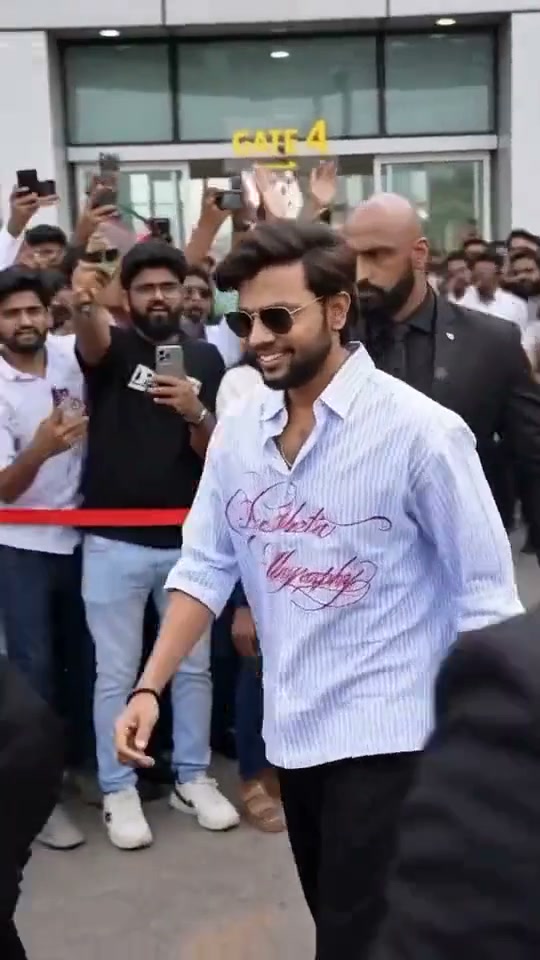
Airport Star Arrival puts the lead in the clear path between an arrivals gate and a crowd of fans. The reference begins behind raised phones and nearby shoulders, then reveals a man in sunglasses walking beside security staff while people film him from behind a red barrier. Daylight, glass doors and the crowded foreground make the airport setting different from a hotel red-carpet exit. This direction starts with the lead already visible inside a prepared arrivals scene. Keep the walk short, let the face remain above the surrounding phones and end on one modest wave. The scene should stay readable as one camera view rather than becoming an entire journey to a waiting car.
Best for
- A creator's star-treatment joke
- a travel-themed portrait or a short entrance scene with an energetic background. A glass terminal facade
- crowd barriers and a few raised phones can establish the setting quickly. Keep security or supporting figures visually secondary. The lead's recognizable face and measured walk should remain the focus
- with enough clear floor between them and the camera for a couple of steps.
Prepare your airport entrance composition
Choose your photo
Upload one prepared airport-arrivals image containing the lead, surrounding fans or security and a clear walking corridor. Use a knee-up or full-body view with the face unobstructed and both shoulders distinct. Keep raised phones to the sides rather than directly across the eyes. The same image must establish the whole composition; an isolated face portrait does not supply the gate, crowd and body placement by itself.
Generate with the template
Keep the lead visible between the gate and fans, with a few steady steps and one small wave in the same airport view.
Review and download
Track the lead's face through the walk and check that it is not transferred onto a fan or guard. Look at shoe contact, the barrier line and spacing between shoulders as the group moves. Raised phones should stay attached to their owners' hands. Keep the arrival signage as background texture rather than relying on readable generated gate numbers. A small final wave gives the scene a clean stopping point.
Guide a short walk and modest wave
Use this reference direction as a starting point in custom-prompt mode. The template runs fixed instructions; remixing is a separate workflow, not an edit to the preset.
Animate the lead and airport-arrivals setting already composed in the uploaded image. Preserve the lead's recognizable face, hair, sunglasses or existing eyewear, outfit and body proportions. Keep the glass terminal, barrier, supporting people and raised phones in their original arrangement. The lead takes two short natural steps along the clear corridor, smiles toward the crowd and makes one small wave with an available hand. Let the background fans make subtle phone and head movements while staying in place. Use a gently tracking medium view in consistent daylight. Keep feet grounded, shoulders separated and the face readable. No hotel cut, car scene, new guards, extra limbs, readable sign generation, captions or logos.
Before you create
Does this include a hotel exit and a drive away as well?
This page concentrates on the airport arrivals scene. The source offers other celebrity-arrival variants, but the direction here keeps the glass terminal, fan barrier and short walking corridor in one view. Prepare that setting in the uploaded image and animate the lead's steps and wave. It does not promise a multi-location hotel-and-car sequence from one frame.
Can I change the creative direction?
The preset uses fixed instructions. Copy the reference direction into custom-prompt mode to adapt it; this does not change the preset itself.
What video output should I expect?
The default length is 9s (reference ratio 540/960). The output follows your uploaded photo's aspect ratio and suits A creator's star-treatment joke, a travel-themed portrait or a short entrance scene with an energetic background. A glass terminal facade, crowd barriers and a few raised phones can establish the setting quickly. Keep security or supporting figures visually secondary. The lead's recognizable face and measured walk should remain the focus, with enough clear floor between them and the camera for a couple of steps..
Make your Airport Star Arrival video
Upload a prepared arrivals scene and put your own face at the center of a short, fan-lined celebrity entrance.