
Upload a photo
PNG, JPG or WebP · up to 10 MB
Choose a photo to generate a video.
A hallway approach with a camera-side surprise
Create a Closing Door Prank AI video from a prepared hallway photo. Guide one runner toward the door, hide the approach and reveal a surprise in ReelAI.
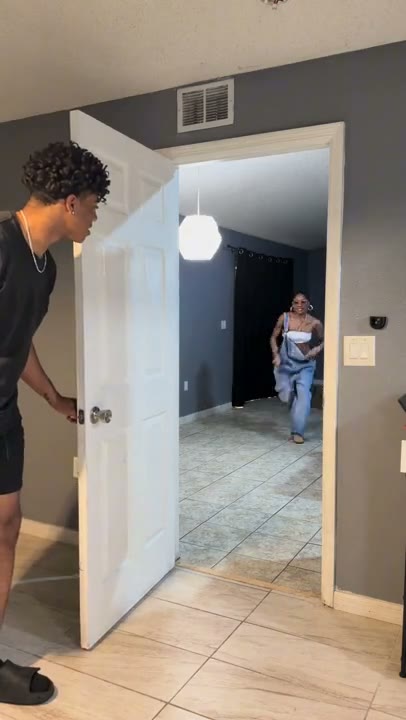
Closing Door Prank uses distance and a swinging door to set up its surprise. One person waits beside the doorway while the other runs from farther down the hall; the door briefly hides the approach before the runner appears on the camera side. The chosen adult reference repeats the idea with the two people trading places. This direction keeps one approach-and-reveal cycle in a steady shot, rather than reducing the effect to an ordinary door closing or promising the whole repeated edit. Your starting image provides both people, their positions and the hallway geometry. The preview is third-party inspiration, not a verified ReelAI output.
Best for
- Hallway prank Reels
- two-person reaction scenes
- door-occlusion surprise clips
Make your Closing Door Prank scene
Choose your photo
Use one prepared image with two adults: one near a half-open door and the other clearly visible farther down the hallway. Include the door edge, handle, floor and open route between them. Keep both faces readable and leave space on the camera side for the runner's final appearance. Two unrelated portrait uploads are not the input for this preset.
Generate with the template
Upload your prepared two-person hallway scene and select Generate video. The direction keeps the camera fixed as one person approaches the door, passes briefly behind it and appears on the near side for the surprise.
Review and download
Follow the runner through the approach, occlusion and final reveal. Their face and clothes should stay consistent, feet should follow the hallway floor and neither body should merge into the door. Check that the hinge and handle remain on the correct side and that the final close-up is the same runner rather than the door holder.
One run, a brief occlusion and a reveal
Use this reference direction as a starting point in custom-prompt mode. The template runs fixed instructions; remixing is a separate workflow, not an edit to the preset.
Animate the two adults already arranged in the supplied hallway scene. Preserve their distinct faces, hairstyles, outfits and body proportions, and keep the doorway, hinge, handle and corridor layout consistent. Use a fixed camera on the room side of the half-open door. The adult beside the door glances down the hallway while the other, initially farther away, runs toward the opening with a playful expression. Let the door swing partway across the camera's view as the runner approaches, briefly hiding the movement. The runner slips through the remaining opening and appears close on the camera side with a surprised grin, while the person holding the door looks back toward them. Keep the door clear of both bodies and finish with both people balanced. Show one approach-and-reveal cycle rather than exchanging roles and repeating. No extra people, identity swaps, door collisions, falling, captions, countdown lettering or camera cuts.
Before you create
Will Closing Door Prank copy the full countdown and role-swap sequence?
This version guides one original hallway approach, a brief door occlusion and a camera-side reveal. It does not copy an exact countdown recording, precise reference timing or the full repeated role swap. Prepare both people and their near/far positions in one image first. Review the generated passage through the doorway before choosing the take you want to download.
Can I change the creative direction?
The preset uses fixed instructions. Copy the reference direction into custom-prompt mode to adapt it; this does not change the preset itself.
What video output should I expect?
The default length is 10s (reference ratio 406/720). The output follows your uploaded photo's aspect ratio and suits Hallway prank Reels, two-person reaction scenes, door-occlusion surprise clips.
Set up your hallway surprise
Choose a scene with clear near and far positions. Review the runner, door edge and final reveal, then download the take that keeps the surprise easy to follow.