
Upload a photo
PNG, JPG or WebP · up to 10 MB
Choose a photo to generate a video.
A balcony character reply with expressive hands and attitude
Upload one photo. Animate expressive hand gestures and a flask-holding reaction from your character portrait in a conversational 12-second clip. Ready to share.
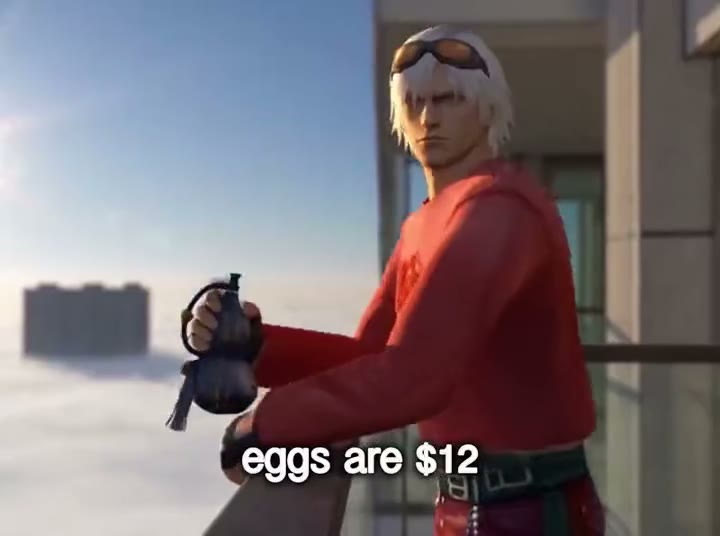
Very Chinese Time works here as a stylized character reaction rather than a wardrobe transformation. Every sampled frame shows a white-haired 3D character wearing goggles, a red top and fingerless gloves on a balcony above a hazy city, holding a dark flask-like object while gesturing beneath changing dialogue subtitles. This Very Chinese Time direction uses one starting image and keeps the movement continuous, concentrating on the visible action rather than rebuilding every source edit.
Best for
- game-character reaction posts
- animated avatar replies
- conversational meme edits with a recognizable prop using Very Chinese Time when a still image needs a short
- focused visual story.
Create your Very Chinese Time video from one image
Choose your photo
Use a waist-up character portrait with a clear face and both hands visible. Include the small flask-like prop in the starting image if you want that gesture. Red clothing and a simple balcony or city backdrop bring the composition closer to the reference without crowding the silhouette. Set up your Very Chinese Time starting frame before choosing the motion.
Generate with the template
Select Very Chinese Time and guide a conversational head tilt, an open-hand gesture and a relaxed prop-holding pause. Keep the action focused on this short sequence so the opening, movement and final pose each have time to read.
Review and download
Watch the hand wrapped around the flask and the separation between fingers on the gesturing hand. Goggles should remain fixed to the head as the expression changes. Keep the balcony rail straight and leave enough room below the face for any later caption placement. Review the whole Very Chinese Time clip once at normal speed, then pause on the busiest moment before choosing your final take.
Shape the Very Chinese Time motion
Use this reference direction as a starting point in custom-prompt mode. The template runs fixed instructions; remixing is a separate workflow, not an edit to the preset.
Animate the uploaded image for Very Chinese Time. Preserve the character’s face, white hair if present, goggles, clothing and stylized 3D proportions. Keep a small flask-like object steady in one hand while the other makes expressive conversational gestures. Add a slight head tilt and an amused pause against the existing balcony and hazy city. Maintain distinct fingers and stable railings without embedded subtitles or outfit transformations.
Before you create
Does Very Chinese Time generate the reference dialogue captions?
This direction creates the character motion in one continuous shot. The source uses embedded dialogue subtitles, but captions are a separate edit here. Start with a stylized figure to retain the game-character look, then add your own reply text after choosing the clearest gesture and expression.
Can I change the creative direction?
The preset uses fixed instructions. Copy the reference direction into custom-prompt mode to adapt it; this does not change the preset itself.
What video output should I expect?
The default length is 12s (reference ratio 720/536). The output follows your uploaded photo's aspect ratio and suits game-character reaction posts, animated avatar replies, conversational meme edits with a recognizable prop using Very Chinese Time when a still image needs a short, focused visual story..
Make your Very Chinese Time video
Start with a well-composed image and turn it into Very Chinese Time motion with a clear opening and a memorable finish.