
Upload a photo
PNG, JPG or WebP · up to 10 MB
Choose a photo to generate a video.
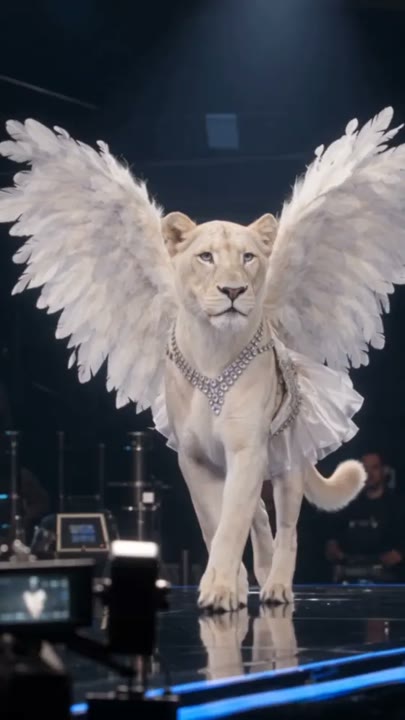
White wings and a confident catwalk finish
Create a VS Runway AI video from one full-body photo. Try an angel-inspired catwalk with white wings, measured steps and a small wave for your own fashion edit.
The VS Runway effect brings an angel-inspired fashion-show mood to a full-body portrait. Large white wings frame the subject as they take two measured catwalk steps, give a small wave and settle into a confident pose. Soft audience silhouettes and a bright runway establish the event without introducing several featured models. This single-image version creates a new fashion walk, not an appearance in an existing show or a copied model routine. A clear silhouette gives the wings and outfit room to read. Use it for a fantasy fashion introduction, an outfit reveal or a playful catwalk Reel.
Best for
- Fantasy fashion introductions
- angel-wing outfit reveals
- personal catwalk Reels
Create your VS Runway angel walk
Choose your photo
Choose one adult in a full-body standing photo with visible shoes and space around both shoulders. A prepared winged-runway image can guide the starting look more closely. Avoid tight arm crops or an outfit hidden behind large foreground objects.
Generate with the template
Upload your standing photo and generate the catwalk scene. The effect adds a winged fashion look, guides two measured steps and ends with a small wave and clear finishing pose toward the camera.
Review and download
Watch the wings where they meet the shoulders and check that the feathers remain separate from the arms. The steps should stay grounded, the face should remain recognizable and the final wave should not distort the hand.
Two measured steps and one small wave
Use this reference direction as a starting point in custom-prompt mode. The template runs fixed instructions; remixing is a separate workflow, not an edit to the preset.
Create an angel-inspired fashion walk using the single adult in the uploaded full-body photo. Preserve their recognizable face, hairstyle and body proportions. Add an elegant fully dressed runway look with large white feathered wings, then place the subject on a bright catwalk with soft audience silhouettes. They take two measured forward steps, give one small wave and hold a confident finishing pose. Use a steady frontal camera with gentle backward tracking. Keep the wings attached and balanced, not flapping into the lens. No additional featured models, official logos, copied runway footage, captions or rapid cuts.
Before you create
Does VS Runway place me in the original fashion-show footage?
VS Runway generates a new angel-inspired catwalk scene from one photo. It does not edit an existing show, reproduce a particular model's full routine or create an official appearance. The white wings, short walk and wave provide the fashion-show visual direction while your uploaded subject remains the featured identity.
Can I change the creative direction?
The preset uses fixed instructions. Copy the reference direction into custom-prompt mode to adapt it; this does not change the preset itself.
What video output should I expect?
The default length is 12s (reference ratio 406/720). The output follows your uploaded photo's aspect ratio and suits Fantasy fashion introductions, angel-wing outfit reveals, personal catwalk Reels.
Give your portrait a winged runway moment
Choose a clear full-body portrait and create your angel-inspired walk. Review the wings, steps and wave, then download the take with the strongest runway silhouette.