
Upload a photo
PNG, JPG or WebP · up to 10 MB
Choose a photo to generate a video.
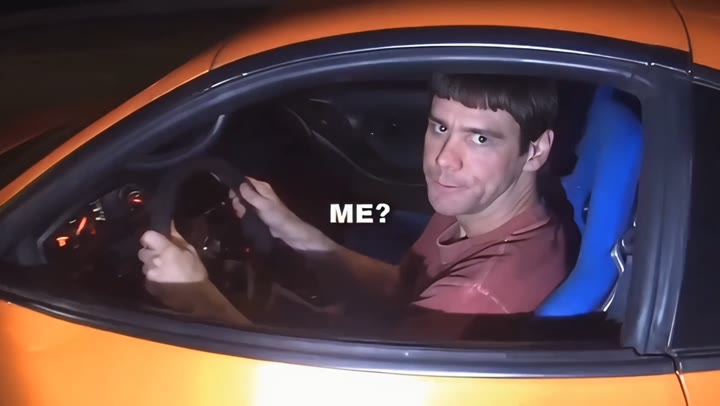
A driver with a very puzzled expression
Create a What Stop Sign inspired AI video from one person or pet photo. Explore a puzzled driver and a comic car-window reaction, then review it on ReelAI.
What Stop Sign works as a reaction joke even before a caption is added. A driver looks out through the window, tilts their head, and seems genuinely confused by a question from someone off camera. The preset builds a new parked-car scene around your photo instead of requiring a traffic-stop reference clip. Subtle colored reflections suggest the setting without distracting from the expression. A deadpan cat, an expressive dog, or a clear human portrait can each change the tone. Use the held stare as a setup for your own text or a separately edited exchange.
Best for
- Puzzled pet reactions
- Driver meme captions
- Deadpan comedy inserts
Create a What Stop Sign reaction
Choose your photo
Choose a sharp face-and-shoulders image with uncovered eyes and a little space around the head. For pets, keep ears and muzzle visible. A simple starting background gives the car-window framing less clutter to work around.
Generate with the template
Generate one reaction clip with the preset selected. The direction places the subject in a stationary car and asks for a modest head tilt followed by a clear look toward the visitor.
Review and download
Check the face against the window opening and watch the neck during the head tilt. Keep the expression readable rather than exaggerated. If your joke needs a specific line, add it separately instead of expecting precise spoken dialogue.
Direct the questioning head tilt
Use this reference direction as a starting point in custom-prompt mode. The template runs fixed instructions; remixing is a separate workflow, not an edit to the preset.
Use the single person or pet in the uploaded photo as a puzzled driver in a parked car. Frame a close view through the open side window at dusk, with faint red and blue reflections behind the vehicle. Preserve the subject's visible facial features or fur markings. Begin with a neutral look outside, add a slow questioning head tilt and raised eyebrows where natural, then hold a confused stare toward the off-camera visitor. Keep the car stationary and the window edge stable. Use one shot without written signs, dialogue captions, or additional foreground faces.
Before you create
Does What Stop Sign generate the original spoken exchange?
The prepared direction focuses on the confused driver's visual reaction. It does not supply the original dialogue or synchronize a recording to the subject. You can use the pause for a text caption or add your own exchange in an editor after checking that the face, neck, and window stay coherent.
Can I change the creative direction?
The preset uses fixed instructions. Copy the reference direction into custom-prompt mode to adapt it; this does not change the preset itself.
What video output should I expect?
The default length is 11s (reference ratio 720/406). The output follows your uploaded photo's aspect ratio and suits Puzzled pet reactions, Driver meme captions, Deadpan comedy inserts.
Cast your own confused driver
Choose an expressive portrait or pet image and turn the confused-driver idea into a short reaction you can finish with your own caption or audio.