
Upload a photo
PNG, JPG or WebP · up to 10 MB
Choose a photo to generate a video.
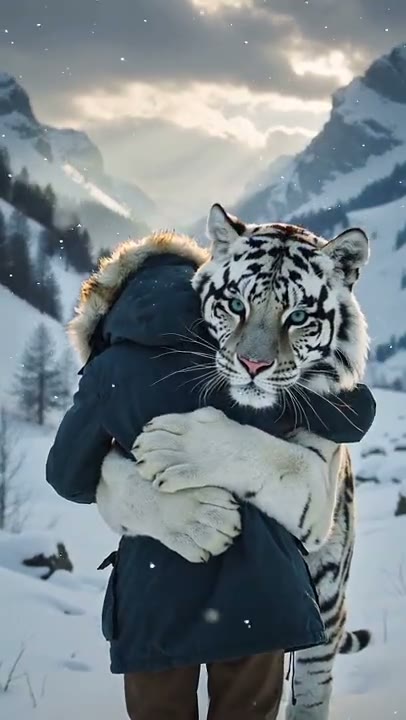
A face-to-face embrace in a winter scene
Create a Tiger Hug AI video from one prepared scene. Explore a gentle face-to-face embrace in a snowy setting, then review the person and animal on ReelAI.
Tiger Hug centers on the moment a person and a large animal meet in a gentle embrace. In the reference, a white tiger approaches through a snowy pine setting while a rear-three-quarter camera keeps the person's coat, the animal's head, and the closing paws visible together. Both figures face each other as contact begins. This direction uses one prepared scene image and a short approach, leaving the held hug as the main action. Try it for a fantasy greeting or winter character scene, with readable contact rather than a chase, transformation, or animal settling nearby.
Best for
- Fantasy animal greetings
- Winter character scenes
- Gentle embrace edits
Create a Tiger Hug scene
Choose your photo
Prepare one image with the person and tiger facing each other in the same setting. A rear three-quarter view of the person can match the reference composition. Keep the tiger's front paws, the person's arms, and enough snowy ground visible to establish their positions.
Generate with the template
Generate one clip from the prepared person-and-tiger image. The fixed direction asks for a modest approach and a short frontal embrace, keeping the animal's head and paws readable instead of adding complicated acrobatics.
Review and download
Check which way both figures face before watching the embrace. Follow the front paws around the upper back and make sure the animal's head stays separate from the shoulder. Inspect the snow contact and use a brief held moment if the approach becomes less coherent.
Direction for the approach and paw placement
Use this reference direction as a starting point in custom-prompt mode. The template runs fixed instructions; remixing is a separate workflow, not an edit to the preset.
Animate the person and white tiger already arranged in the single uploaded snow-scene image. Keep the person's coat and silhouette recognizable, with the person shown from behind or at a slight three-quarter angle. The tiger approaches from the right toward the person's front, pauses, and rises just enough to place its front paws gently around the upper back. Let the person lift both arms into a brief face-to-face embrace. Keep the tiger's head visible beside the shoulder and the lower paws connected to the snow. Use a fixed medium-wide view, quiet pine trees, soft winter light, and no captions, sudden leaps, or extra animals.
Before you create
Can I create a Tiger Hug from a selfie alone?
For this preset, prepare one complete scene image that already shows the person and tiger together. A selfie alone does not establish the animal's placement, scale, or the space for their arms and paws to meet. Keep both figures facing each other, then review the head separation and shoulder-level contact as the embrace closes.
Can I change the creative direction?
The preset uses fixed instructions. Copy the reference direction into custom-prompt mode to adapt it; this does not change the preset itself.
What video output should I expect?
The default length is 5s (reference ratio 406/720). The output follows your uploaded photo's aspect ratio and suits Fantasy animal greetings, Winter character scenes, Gentle embrace edits.
Explore your Tiger Hug moment
Arrange both figures in one clear winter scene and explore a gentle embrace, using a steady view to keep the animal's paws and the person's response visible.