
Upload a photo
PNG, JPG or WebP · up to 10 MB
Choose a photo to generate a video.
One look back before the boulevard opens up
Make a GTA 6-style AI video from one portrait. Drive a convertible on a neon Vice City boulevard, with wet streets and a smooth chase-camera follow shot.
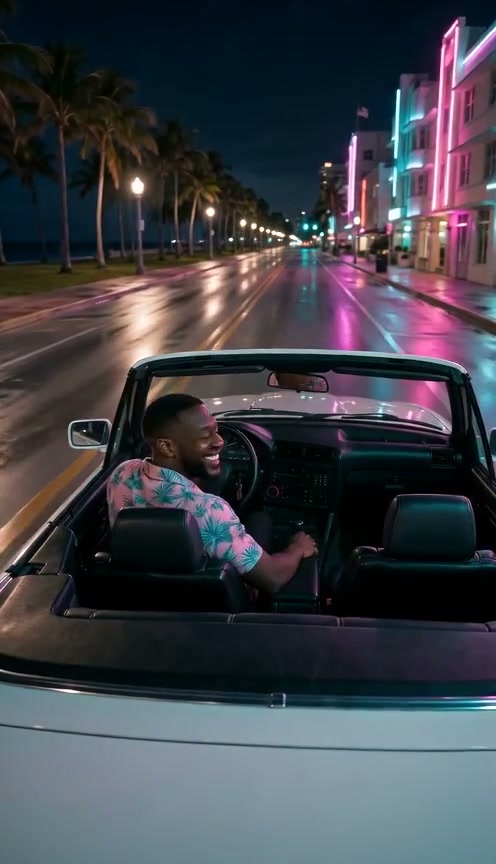
This GTA 6-style night drive brings the Vice City look to your portrait: pink and teal reflections, palm-lined streets and a chase camera following an open-top car. In the reference, a driver in a floral shirt looks back toward the camera from a pale convertible, turns forward and continues down a wet boulevard. Neon buildings stay to the right while palms and the dark waterfront stretch along the left. This is a third-party inspiration clip, not a verified ReelAI result. The preset uses one portrait as the driver reference and guides a compact cinematic drive rather than building a playable game or a multi-scene trailer. Keep the action simple: one look back, hands returning to the wheel and a smooth forward glide through the lights. A prepared car portrait can anchor the setting more closely.
Best for
- GTA 6-style portrait edits
- neon convertible clips
- cinematic night-drive posts
Turn a portrait into a neon night drive
Choose your photo
Use one clear portrait of a single person with the face and both shoulders visible. Avoid heavy shadows or an object covering the face. A prepared image of that person at the wheel of an open-top car is a closer starting point if you want the vehicle and pose to remain specific.
Generate with the template
Upload one driver portrait and select Generate video. The preset guides an open-top car scene with a glance back and a smooth chase-camera move.
Review and download
Watch the driver's face during the look back, then check the hands as they settle on the wheel. The car should stay one consistent shape, with reflections moving along the road rather than through the bodywork. Choose a smooth follow shot with stable lane direction and no sudden extra passengers.
Follow the convertible through the palm-lined lights
Use this reference direction as a starting point in custom-prompt mode. The template runs fixed instructions; remixing is a separate workflow, not an edit to the preset.
Use the single person in the uploaded portrait as the recognizable driver reference. Preserve their facial features, hairstyle and compatible clothing. Establish a pale unbranded open-top convertible on a wet palm-lined seafront boulevard at night. Pink and teal neon buildings reflect on the asphalt, with a dark waterfront and palms along one side. Use a smooth rear chase-camera view slightly above the back seats, keeping the driver visible over one shoulder. Begin with the driver making a brief relaxed glance back toward the lens, then turning forward, settling both hands naturally on the wheel and driving steadily along the lane. The camera follows at a consistent distance as neon reflections and streetlights pass. Keep one driver, an empty passenger seat, stable vehicle geometry and believable wheel contact with the road. No game interface, exact game scene, extra passengers, abrupt speed changes, collisions, readable signs, logos or cuts.
Before you create
Does this create gameplay or an entire GTA 6 trailer?
This preset creates a short cinematic night-drive interpretation from one image. It is not gameplay and does not assemble a full trailer or combine separate driver and passenger photos. The neon road, car and camera movement are guided by the preset direction.
Can I change the creative direction?
The preset uses fixed instructions. Copy the reference direction into custom-prompt mode to adapt it; this does not change the preset itself.
What video output should I expect?
The default length is 10s (reference ratio 496/864). The output follows your uploaded photo's aspect ratio and suits GTA 6-style portrait edits, neon convertible clips, cinematic night-drive posts.
Take your portrait on a neon night drive
Choose a clear driver portrait, create the neon boulevard scene and download the smoothest take.