
Upload a photo
PNG, JPG or WebP · up to 10 MB
Choose a photo to generate a video.
A sleigh arrives behind your portrait
Turn one seated portrait into a Santa Sleigh AI video with a snowy backdrop, a pointing gesture and reindeer arriving behind you. Shape a short holiday reveal.
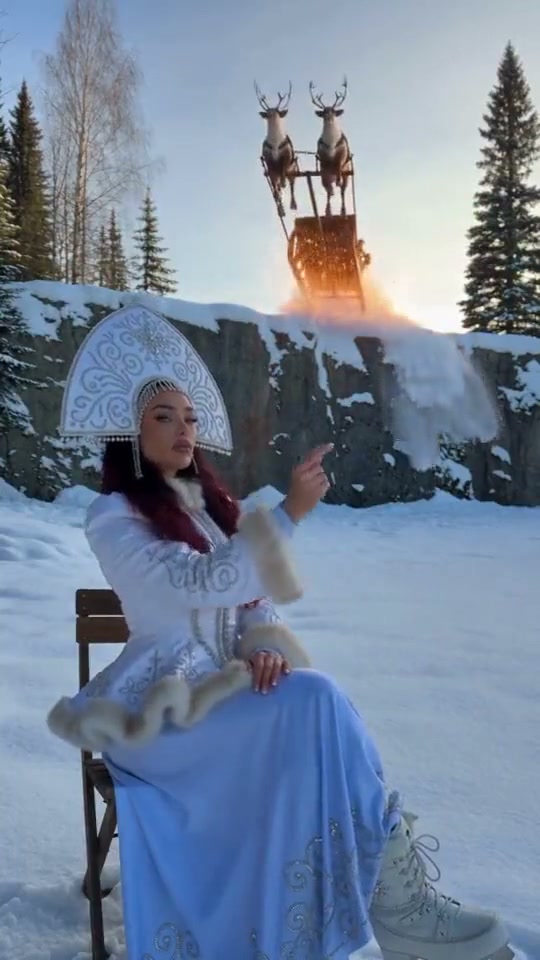
Santa Sleigh makes a quiet seated portrait the foreground of a snowy arrival. The reference features a woman in a blue Snow Maiden dress, a wooden chair and reindeer descending behind a rock wall. Its spectacle happens behind the person. Your direction keeps that foreground-background contrast in one continuous view, with a small pointing gesture followed by a sleigh appearing in the distance.
Best for
- A winter greeting with one recognizable lead and a visible snowy background. Leave open space behind the chair for the arrival rather than filling the frame with a face.
Set up your snowy arrival
Choose your photo
Use one prepared seated portrait with the complete chair and some ground visible. A simple winter outfit and clear separation between the person and background make the gesture easier to read.
Generate with the template
Keep one seated person in the foreground and describe the sleigh arriving farther behind the chair.
Review and download
Check that the face, headdress or hair stay consistent. The reindeer should remain behind the chair, with the harness and sleigh moving together rather than crossing the person.
A seated winter reveal
Use this reference direction as a starting point in custom-prompt mode. The template runs fixed instructions; remixing is a separate workflow, not an edit to the preset.
Animate the seated person in the supplied snowy scene. Preserve the face, hair, winter outfit, chair and body proportions. Use a fixed medium-wide view. The person lifts one hand to point upward, then turns slightly to notice a small sleigh drawn by two reindeer descending gently into the distant snowy background. Keep the animals well behind the chair and the person, with stable harness connections and a light snow disturbance. Finish on a still foreground portrait with the sleigh visible behind. No fire, collisions, costume changes, captions, logos or cuts.
Before you create
Does the uploaded person have to wear a Santa costume?
No. The reference uses a Snow Maiden outfit, and a winter portrait can establish your own lead. The Santa Sleigh theme comes from the snowy setting and arriving reindeer; keep the costume you want in the prepared photo.
Can I change the creative direction?
The preset uses fixed instructions. Copy the reference direction into custom-prompt mode to adapt it; this does not change the preset itself.
What video output should I expect?
The default length is 9s (reference ratio 540/960). The output follows your uploaded photo's aspect ratio and suits A winter greeting with one recognizable lead and a visible snowy background. Leave open space behind the chair for the arrival rather than filling the frame with a face..
Bring the sleigh into your scene
Start with a winter scene that has room for the reindeer to appear.