
Upload a photo
PNG, JPG or WebP · up to 10 MB
Choose a photo to generate a video.
Make the aircraft feel enormous
Turn one full-body photo into a Plane Over Your Head AI video. Keep your subject in view as an airliner passes overhead in a dramatic low-angle street scene.
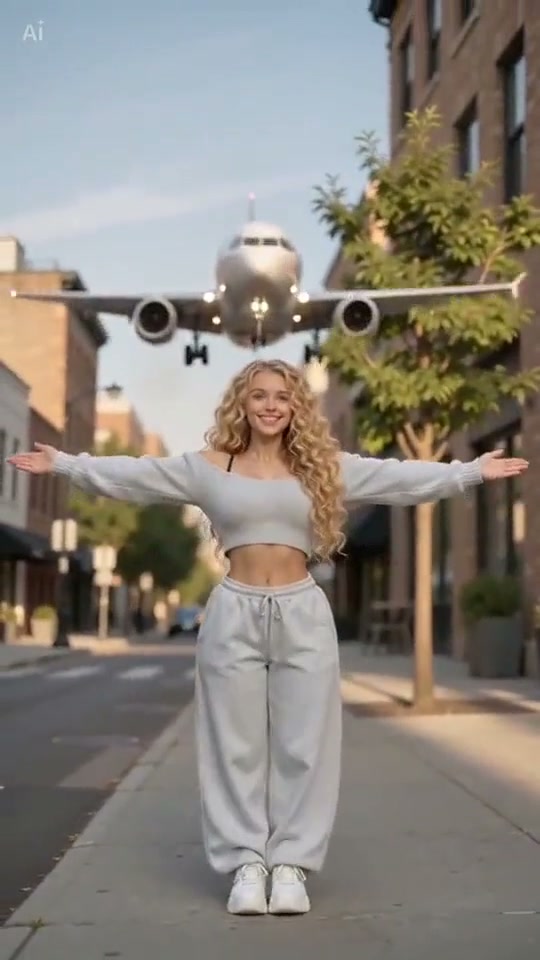
Plane Over Your Head contrasts a small street-level subject with a large aircraft crossing above. The selected reference begins close to a blonde woman on a sunlit city street, widens to show her outstretched arms and ends with the airliner's underside filling the top of the frame. The direction keeps that scale contrast in a short, low-angle pass.
Best for
- A dramatic portrait reveal with clear space above the lead. A prepared street composition can work without adding an airport setting or a separate aircraft upload.
Leave room above your subject
Choose your photo
Use one full-body image with a clear face, visible arms and open sky above. Keep buildings away from the head and leave enough upper-frame space for the aircraft silhouette.
Generate with the template
Keep the lead visible and set one airliner on a clear path across the upper frame.
Review and download
Watch the face as the subject looks upward and check that the wings remain distinct from buildings and arms. The aircraft should follow one consistent path without changing scale abruptly or covering the lead's face.
A single low-angle flyover
Use this reference direction as a starting point in custom-prompt mode. The template runs fixed instructions; remixing is a separate workflow, not an edit to the preset.
Animate the single person already composed on the city street in the uploaded image. Preserve their recognizable face, hair, clothing, body proportions and street placement. Use a steady low-angle medium-wide view with clear sky above. The person gently opens their arms and looks upward as one plain passenger airliner approaches in the distant upper background, passes overhead and exits beyond the top of the image. Keep its wings symmetric and the person's face unobstructed. Maintain consistent buildings and grounded feet. No collision, airport change, additional aircraft, logos, captions or abrupt cuts.
Before you create
Can I use a street photo instead of an airport portrait?
Yes. The actual reference is a city-street scene. A street photo with room above the subject fits the same low-angle composition; the aircraft is part of the described scene rather than a second uploaded reference.
Can I change the creative direction?
The preset uses fixed instructions. Copy the reference direction into custom-prompt mode to adapt it; this does not change the preset itself.
What video output should I expect?
The default length is 10s (reference ratio 540/960). The output follows your uploaded photo's aspect ratio and suits A dramatic portrait reveal with clear space above the lead. A prepared street composition can work without adding an airport setting or a separate aircraft upload..
Create your overhead plane scene
Start with a full-body street portrait and open space overhead.