
Upload a photo
PNG, JPG or WebP · up to 10 MB
Choose a photo to generate a video.
A small creature with a curious expression
Make a Baby Dragon AI video from one waist-up photo. Bring a tiny creature into your cupped hands, then give it a soft blink, a wing stretch and a curious look.
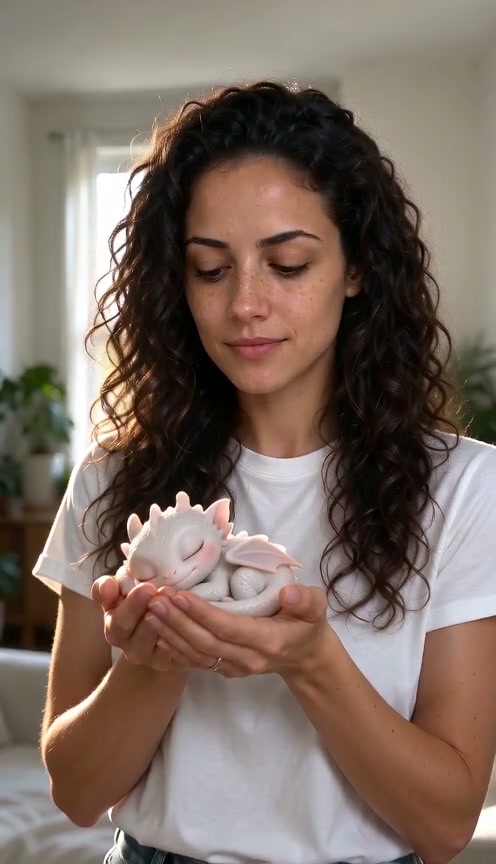
The Baby Dragon effect makes a quiet portrait feel like a miniature fantasy story, placing a creature small enough to rest in cupped hands with a blink, a gentle wing stretch and a curious turn toward the person holding it. The reference shows a woman in a white top holding a pale dragon with pink wings; the creature lifts its head and sits upright as she smiles. This third-party preview illustrates the mood and scale, not a verified ReelAI generation. Start with a waist-up portrait that leaves room for your hands. The prompt introduces a small creature into the palms and guides a few gentle movements. Clear fingers and even lighting give that interaction a stronger visual starting point. A close composition keeps the moment readable without needing a flying sequence or a changing background.
Best for
- Fantasy pet portraits
- tiny creature stories
- gentle reaction clips
Turn your portrait into a tiny dragon encounter
Choose your photo
Upload one waist-up photo with both hands visible, ideally cupped together in front of you. Leave room above the palms for the creature and keep your face unobstructed. Soft, even light helps the new subject fit the scene. A prepared fantasy portrait also works if you already have one.
Generate with the template
Upload a waist-up photo and select Generate video. The preset guides a small dragon into your cupped hands, followed by gentle creature movement.
Review and download
Check the fingers where they meet the creature. The wings should stay separate from the hands, and the body should remain the same size. Look for a smooth head lift and a calm expression from the person. Avoid a take where the tail merges into clothing or an extra wing appears.
A blink, a wing stretch and a gentle head turn
Use this reference direction as a starting point in custom-prompt mode. The template runs fixed instructions; remixing is a separate workflow, not an edit to the preset.
Use the uploaded waist-up portrait as the starting visual reference. Keep the person's recognizable appearance, clothing and general setting. As their two hands settle into a cupped pose, introduce one tiny pale dragon with soft pink wings resting in the palms. It becomes visible gently without a flash, then blinks, lifts its head, opens and relaxes its wings, and looks toward the person. The person glances down with a small smile and holds still. Keep the creature palm-sized and supported throughout. Use a stable portrait camera and consistent soft light. Maintain separate fingers, wings and tail. No extra people, flight, fire, growing creature, merged limbs, captions, logos or cuts.
Before you create
Do I need a dragon in my photo already?
No. A waist-up portrait with cupped hands is a useful starting point. The prompt guides a tiny dragon into the palms and animates the interaction. Its appearance, placement and motion depend on the photo and model. You can also begin with a picture that already contains a fantasy creature.
Can I change the creative direction?
The preset uses fixed instructions. Copy the reference direction into custom-prompt mode to adapt it; this does not change the preset itself.
What video output should I expect?
The default length is 8s (reference ratio 496/864). The output follows your uploaded photo's aspect ratio and suits Fantasy pet portraits, tiny creature stories, gentle reaction clips.
Bring your tiny companion to life
Choose a portrait with your hands in view, create a fantasy encounter and download a favorite take.