
Upload a photo
PNG, JPG or WebP · up to 10 MB
Choose a photo to generate a video.
One shared moment through an imagined passage of time
Create a Growing Up Beside You AI video from one adult-and-pet photo. Imagine a gentle age transition while your pet stays close, then review it in ReelAI.
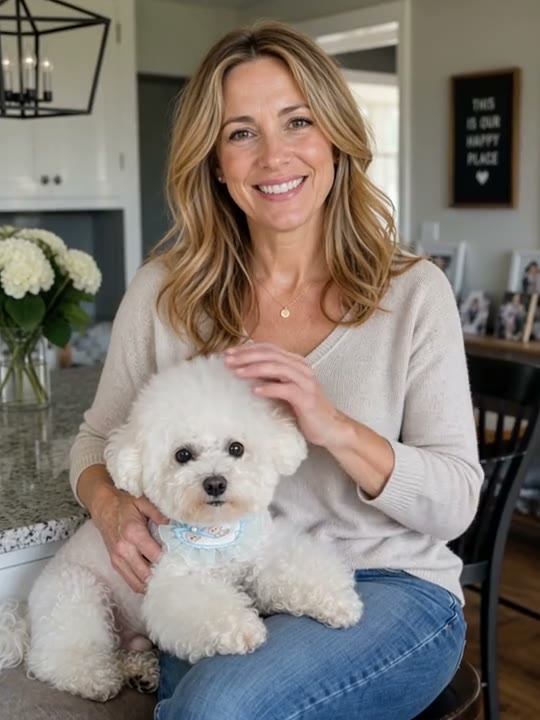
Growing Up Beside You holds onto one shared moment while the person appears to age. The selected reference shows an adult holding a small white dog in the same room and outfit as the hair turns grey and the face takes on an older appearance. This preset follows that imagined age-transition idea from a single photo, not a comparison of two dated family pictures. A small petting gesture and a steady camera keep attention on the person and companion as the change develops. The reference is third-party inspiration; your generated appearance and transition can differ. Use a clear adult-and-pet portrait with both faces visible.
Best for
- Imagined aging portraits
- adult-and-pet memory Reels
- reflective single-scene transformations
Create your Growing Up Beside You portrait
Choose your photo
Choose one clear photo of an adult holding or sitting closely beside one pet. Keep the adult's face, hair, hands and the pet's face and main fur markings visible. A waist-up composition with a settled pose gives the transition a clear starting point. Use the outfit and room you want to remain in the scene.
Generate with the template
Add your adult-and-pet photo and select Generate video. The direction combines a small petting gesture with a gradual change toward silver hair and an older face, keeping the pose, outfit and companion as the scene's anchors.
Review and download
Watch the adult's face and hair throughout the age transition: the person should remain recognizable instead of abruptly becoming someone else. Check that the hands keep supporting the pet and that its ears, eyes, fur pattern and size stay consistent. Clothing and furniture should not age, dissolve or change along with the face.
A smooth age transition with your pet nearby
Use this reference direction as a starting point in custom-prompt mode. The template runs fixed instructions; remixing is a separate workflow, not an edit to the preset.
Animate the single adult already holding the pet in the supplied portrait into a gentle imagined passage of time. Preserve the adult's recognizable facial structure, hairstyle shape, clothing, seated pose and hands, along with the pet's face, fur pattern, size and supported position. Keep the original room, furniture and lighting consistent. Use one steady waist-up view. Begin with a natural blink and a small affectionate stroke of the pet's back. Gradually transition the adult toward an older appearance through softly silvering hair and natural facial lines, maintaining the same expression and pose throughout the change. Let the pet stay close and give a small blink without changing species or markings. End with the older-looking adult smiling down toward the pet. Keep the age change smooth rather than replacing the person with a different identity. No historical-photo montage, year labels, exact age numbers, extra people, changing pets, camera cuts or costume changes.
Before you create
Does Growing Up Beside You restore two real photos or predict my future face?
This version uses one adult-and-pet image to create an imagined aging effect. It does not compare two historical photographs, add factual year labels or predict a real future appearance. The direction keeps the shared pose and pet in view while changing the adult's hair and facial details. Use a separate editor if you want to assemble an actual then-and-now photo story.
Can I change the creative direction?
The preset uses fixed instructions. Copy the reference direction into custom-prompt mode to adapt it; this does not change the preset itself.
What video output should I expect?
The default length is 5s (reference ratio 540/720). The output follows your uploaded photo's aspect ratio and suits Imagined aging portraits, adult-and-pet memory Reels, reflective single-scene transformations.
Give your shared portrait a passage of time
Choose a clear shared portrait and create an imagined age-transition clip. Review facial continuity, hands and your pet's markings, then download the take that feels most coherent.