
Upload a photo
PNG, JPG or WebP · up to 10 MB
Choose a photo to generate a video.
A small twist with a playful back-and-forth
Create a Pulp Fiction AI dance from one prepared two-person photo. Add a compact twist, knee dips and pointing hands, then review your short scene in ReelAI.
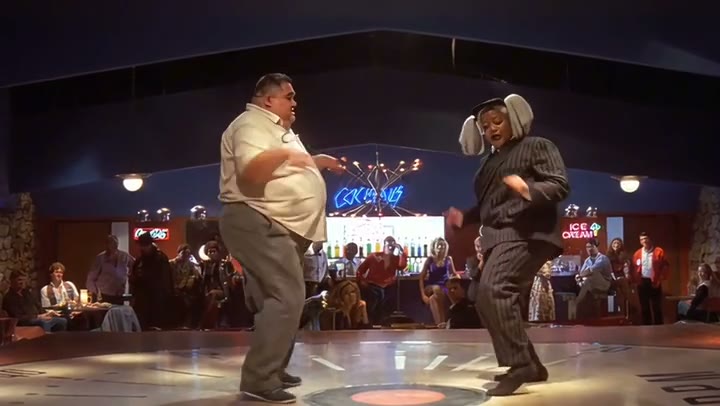
Pulp Fiction AI Dance takes the twist-contest idea into a compact duet. The inspected reference uses a wide diner-stage view of two adults, with bent knees, shifting feet and pointing hands rather than elaborate floor travel. Your prepared photo supplies both people, their clothes and the starting room. The direction focuses on a short exchange of small gestures so each dancer stays readable. Use it for a costume-party memory, a retro couple Reel or a playful friend duet. The preview is third-party inspiration, not a verified ReelAI output or a frame-matched film remake.
Best for
- Retro couple Reels
- costume-party photos
- two-person twist clips
Create your two-person Pulp Fiction dance
Choose your photo
Use one prepared full-body photo containing both adults on the same floor. Include their hands and shoes, leave room between their arms and keep the background simple. This page has one image input, not two separate identity slots.
Generate with the template
Upload the prepared two-person image and select Generate video. The direction guides small foot swivels, knee dips and an answering hand gesture while keeping the camera steady.
Review and download
Watch each dancer's hands and shoes throughout the twist. Feet should stay grounded without sliding through the floor, faces should remain separate, and a pointing hand should return to the same arm. Check that one dancer does not duplicate into the other's space.
Grounded foot swivels and a pointing-hand exchange
Use this reference direction as a starting point in custom-prompt mode. The template runs fixed instructions; remixing is a separate workflow, not an edit to the preset.
Animate the two adults already standing together on the open floor in the uploaded image. Keep each face, hairstyle, outfit, body shape and position distinct. Use a steady full-body front-three-quarter view that includes both pairs of shoes. The dancers softly bend their knees, swivel their feet through a small twist, and shift weight once to each side. One person briefly points two fingers outward while the other answers with a small raised-hand gesture. Let their shoulders follow the footwork, then settle both into relaxed balanced poses. Preserve the room and light direction. Create a new compact duet rather than matching a film performance or recording. No extra dancers, actor likeness substitution, large kicks, fast spins, captions, logos or abrupt cuts.
Before you create
Can I upload two portraits to recreate the movie dance?
This preset animates one image that already contains the pair. It creates an original short twist with your starting scene, not a two-portrait casting workflow or exact film choreography. The source song and original actors are not part of the direction; choose sound separately after downloading.
Can I change the creative direction?
The preset uses fixed instructions. Copy the reference direction into custom-prompt mode to adapt it; this does not change the preset itself.
What video output should I expect?
The default length is 12s (reference ratio 720/406). The output follows your uploaded photo's aspect ratio and suits Retro couple Reels, costume-party photos, two-person twist clips.
Turn your pair photo into a retro duet
Start with both dancers clearly in frame. Review the hands, shoes and spacing, then download the take with the cleanest retro rhythm.