
Upload a photo
PNG, JPG or WebP · up to 10 MB
Choose a photo to generate a video.
Color first, monochrome to finish
Make an Ukwu AI video from one standing photo. Start with a relaxed dance in color, then shift to a closer black-and-white slow-motion portrait and review it.
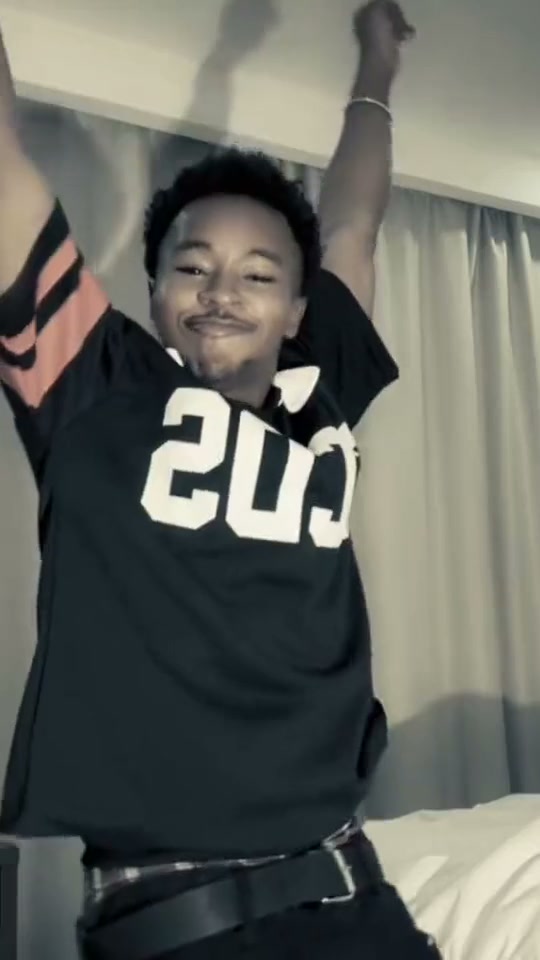
Ukwu changes the treatment of a simple dance: an ordinary color moment becomes a closer, slower monochrome portrait. The reference shows a jersey-wearing performer with both arms raised in a room with pale curtains and a bed. Its later frames have a muted, slightly tinted finish. The creative direction keeps that contrast while leaving the uploaded subject's outfit recognizable.
Best for
- A casual outfit clip
- an understated dance reaction or a portrait that needs one clear visual change. The movement can stay small because the color shift carries the edit.
Create the Ukwu color change
Choose your photo
Use one standing photo from the knees up or head to toe. Keep arms unobstructed and the face evenly lit. A clear outfit silhouette helps the closer monochrome finish remain consistent.
Generate with the template
Keep the short dance and color-to-monochrome finish, or adjust the room and outfit emphasis before generating.
Review and download
Compare the face and jersey or shirt details before and after the grade changes. Look for a gentle approach and slower motion, with no frozen limbs or sudden change of room.
Shape the slow-motion finish
Use this reference direction as a starting point in custom-prompt mode. The template runs fixed instructions; remixing is a separate workflow, not an edit to the preset.
Make an Ukwu-inspired video from the single standing person in the uploaded photo. Preserve their face, hair, body proportions and outfit. Place them in a softly lit room with pale curtains. Begin in natural color with a relaxed weight shift and both arms lifting above shoulder level. As the camera gently approaches, reduce the saturation into a soft black-and-white finish and slow the movement. Keep the expression warm and the hands separate. End on the same person in a closer, steady pose. No new people, exact beat timing, original recording, written text, logos or abrupt identity change.
Before you create
Is Ukwu a full dance routine or an editing effect?
This version centers on the color-to-monochrome change, with a short sway and raised-arm gesture. It does not require a dance recording or copy the source's beat-drop timestamp and soundtrack.
Can I change the creative direction?
The preset uses fixed instructions. Copy the reference direction into custom-prompt mode to adapt it; this does not change the preset itself.
What video output should I expect?
The default length is 10s (reference ratio 540/960). The output follows your uploaded photo's aspect ratio and suits A casual outfit clip, an understated dance reaction or a portrait that needs one clear visual change. The movement can stay small because the color shift carries the edit..
Give your portrait the Ukwu cut
Start with a standing photo and let a small movement lead into a closer, slower portrait.