
Upload a photo
PNG, JPG or WebP · up to 10 MB
Choose a photo to generate a video.
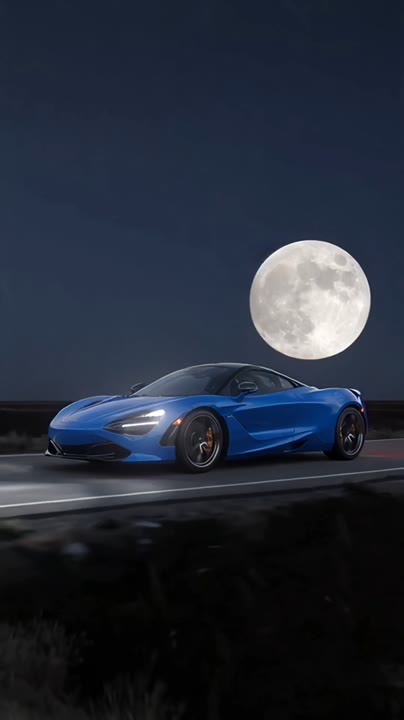
A visual match between headlamp and moon
Try the Moon Headlight Transition AI Video Generator with one car photo. Create a glowing headlamp reveal, cool night reflections and a full-moon visual match.
The Moon Headlight Transition AI Video Generator connects two circles of light: a glowing car headlamp and the full moon above a quiet night road. The camera begins near the lamp, pulls back to show your parked vehicle and then tilts upward for the lunar match. Cool reflections support the night-drive mood without requiring the car to move. This single-photo interpretation does not rebuild a multi-angle orbit or a seamless loop from several reference images. It is suited to automotive introductions, night-themed Reels and a short visual transition centered on your own vehicle.
Best for
- Nighttime car introductions
- headlight detail edits
- automotive transition Reels
Create your nighttime car reveal
Choose your photo
Use a sharp front or front-three-quarter photo of one car with its headlights clearly visible. Keep the whole vehicle inside the frame and avoid heavy reflections hiding the body shape. Circular lamps make the visual match clearer.
Generate with the template
Upload your car photo and generate the night scene. The effect moves from a glowing headlamp to the parked vehicle and then the moon, using a simple camera path rather than a full orbit.
Review and download
Check that the headlamp shape stays consistent during the pullback and the vehicle does not change model. The camera tilt should feel continuous, with one moon in the sky and wheels remaining still on the road.
One car, two circles of light
Use this reference direction as a starting point in custom-prompt mode. The template runs fixed instructions; remixing is a separate workflow, not an edit to the preset.
Create a cinematic nighttime car sequence using the vehicle in the uploaded photo. Preserve its body shape, paint color, wheels and headlight design. Begin close to one illuminated circular headlamp, then pull back smoothly to reveal the parked car on a quiet road. Tilt the camera upward toward a bright full moon with a similar round glow, letting the headlight and moon form a visual match. Use cool blue surroundings and controlled reflections. Keep one vehicle stationary throughout. No full orbit, extra cars, altered badges, drifting wheels, captions or abrupt perspective jumps.
Before you create
Does the Moon Headlight Transition create a full car orbit and loop?
This Moon Headlight Transition version uses one car image for a simpler lamp-to-moon camera move. It does not combine front, side and rear reference photos or guarantee a seamless circular loop. The focus is the visual resemblance between the illuminated headlamp and moon, with a stable parked-car reveal between them.
Can I change the creative direction?
The preset uses fixed instructions. Copy the reference direction into custom-prompt mode to adapt it; this does not change the preset itself.
What video output should I expect?
The default length is 12s (reference ratio 404/720). The output follows your uploaded photo's aspect ratio and suits Nighttime car introductions, headlight detail edits, automotive transition Reels.
Give your headlight a moonlit transition
Choose a clear front-angle car photo and create a moonlit reveal. Review the headlight and body shape, then download the take with the smoothest visual match.