
Upload a photo
PNG, JPG or WebP · up to 10 MB
Choose a photo to generate a video.
A calm pose inside a scene that keeps crashing
Create a Blue Screen Glitch AI video from one scene photo. Add retro error windows and flickering blue flashes around a still subject, then download the clip.
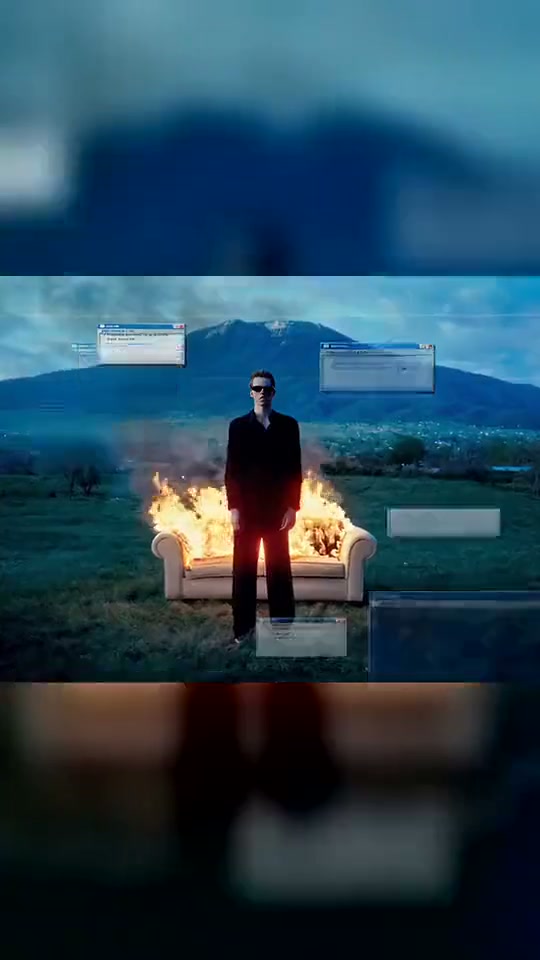
Blue Screen Glitch puts a frozen-looking subject inside a scene that seems to crash around them. Grey error windows appear, the picture breaks into short horizontal tears and a blue panel interrupts the view before the scene returns. The reference places a man in a dark suit in front of a burning armchair, with mountains behind him and blurred bands above and below the central shot. That sample illustrates the visual gag; it is not a result generated on ReelAI. For the closest composition, upload one prepared image containing the person, landscape and armchair together. A normal portrait can still provide a simpler glitch reaction, but it does not supply every part of that staged scene. Keep the person mostly still so the difference between the calm pose and the unstable overlays remains readable.
Best for
- System-crash reaction memes
- surreal portraits
- retro desktop-style video effects
Make a retro crash reaction from one image
Choose your photo
Upload one composed scene image with a clearly visible person and room around the body for overlays. To echo the reference, prepare the outdoor setting and armchair in the same picture first. This preset animates one uploaded image; it is not a separate multi-image scene builder.
Generate with the template
Upload a prepared scene photo and select Generate video. The preset guides short glitch bursts and floating error panels while the main subject holds their pose.
Review and download
Check that the face stays recognizable beneath the glitches and that the error windows do not cover the subject for the whole clip. Look for short blue interruptions followed by a clear return to the original composition. Treat any generated symbols as decorative rather than readable instructions.
Frozen subject, flickering windows and blue interruptions
Use this reference direction as a starting point in custom-prompt mode. The template runs fixed instructions; remixing is a separate workflow, not an edit to the preset.
Animate the supplied single scene image into a stylized retro computer-crash sequence. Preserve the recognizable person, their pose, clothing and the existing setting. Hold the person almost motionless with a fixed camera. Introduce several generic grey desktop-style panels around the frame, with unreadable abstract marks, then brief horizontal digital tearing and two short blue flashes before revealing the same scene again. Keep the face visible for most of the clip. If the source includes a burning chair, animate only its existing flames and smoke gently; do not add a fire where none is present. No readable operating-system messages, real logos, extra people, facial distortion or persistent full-screen obstruction.
Before you create
Will this create a real blue-screen error on my device?
No. The crash is a visual effect inside the generated video. Your uploaded scene is animated with fake windows, digital tearing and brief blue flashes. For a burning-chair backdrop, include that setup in your source image.
Can I change the creative direction?
The preset uses fixed instructions. Copy the reference direction into custom-prompt mode to adapt it; this does not change the preset itself.
What video output should I expect?
The default length is 5s (reference ratio 540/960). The output follows your uploaded photo's aspect ratio and suits System-crash reaction memes, surreal portraits, retro desktop-style video effects.
Give your scene the system-crash treatment
Start with a clear composition, create the glitch sequence and choose the version where the subject remains easy to see.