
Upload a photo
PNG, JPG or WebP · up to 10 MB
Choose a photo to generate a video.
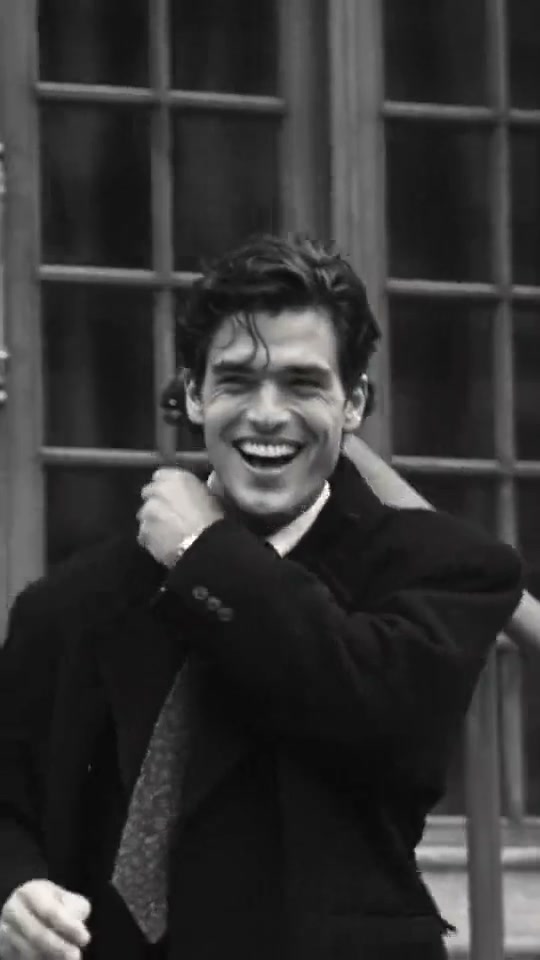
Classic monochrome film grain and a candid laugh
Make a Black and White Cinematic AI video from one photo. Style your portrait in a classic dark overcoat with vintage monochrome film grain and a candid smile.
Black and White Cinematic channels classic European film portraiture with rich monochrome contrast and subtle silver-halide grain. In the reference clip, a dark-haired man in a tailored overcoat, collared shirt and tie walks past stone steps, breaks into a candid outdoor laugh and pauses beneath an umbrella. This preset transforms one uploaded color or monochrome portrait into a poised overcoat character study.
Best for
- Use Black and White Cinematic for timeless profile reels
- editorial menswear or womenswear portraits and understated mood clips where expression and coat silhouette take center stage.
Build your Black and White Cinematic portrait clip
Choose your photo
Choose one clear chest-up or knee-up portrait with defined facial lighting and visible hair texture so your features translate cleanly into rich monochrome tones.
Generate with the template
Review the vintage monochrome film grain, tailored dark overcoat stroll and candid outdoor laugh before generating.
Review and download
Watch the tonal balance across the cheekbones and eyes, the lapel structure of the dark overcoat during the walk and the natural transition into the candid laugh.
Shape the tailored overcoat walk and warm smile
Use this reference direction as a starting point in custom-prompt mode. The template runs fixed instructions; remixing is a separate workflow, not an edit to the preset.
Create a Black and White Cinematic portrait video using the person in the uploaded image. Preserve their recognizable face, bone structure and hairstyle, dressed in a classic tailored dark overcoat over a crisp collared shirt and tie. Render the scene in rich monochrome film tones with subtle vintage grain outside a stone building with steps. Begin with a composed slow walk, then turn slightly toward the lens and break into a warm, candid laugh. Keep facial proportions and coat lapels stable in one continuous shot without text or logos.
Before you create
Do I need to upload a monochrome image for Black and White Cinematic?
No. Upload any clear color or monochrome portrait; the preset applies the vintage film grade, subtle grain and tailored overcoat direction automatically.
Can I change the creative direction?
The preset uses fixed instructions. Copy the reference direction into custom-prompt mode to adapt it; this does not change the preset itself.
What video output should I expect?
The default length is 12s (reference ratio 540/960). The output follows your uploaded photo's aspect ratio and suits Use Black and White Cinematic for timeless profile reels, editorial menswear or womenswear portraits and understated mood clips where expression and coat silhouette take center stage..
Create your monochrome cinema clip
Upload one clear portrait to create a timeless Black and White Cinematic overcoat video.