
Upload a photo
PNG, JPG or WebP · up to 10 MB
Choose a photo to generate a video.
A changing-room curtain with one new look
Upload one prepared fitting-room photo for an AI outfit change video. Animate a curtain opening, one styled look and a clear 12-second full-body reveal.
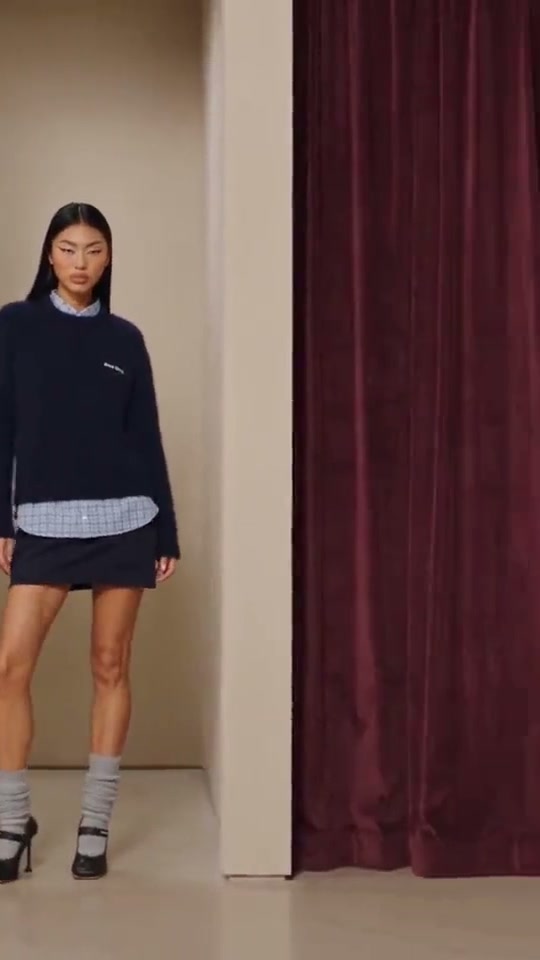
Fitting Room Outfit Change uses a curtain as a natural boundary between the starting pose and a new look. The reference begins on burgundy changing-room curtains, reveals a woman wearing a dark sweater and short skirt, then ends with a dark blazer outfit and sunglasses in another cubicle. The camera travels across several rooms during the full clip. This direction keeps one bay and one wardrobe change, with the person already composed inside the fitting room. A short curtain movement can hide the transition without forcing the body to become a blur of fabric. Finish with an unhurried full-body pose so the shoes, hemline and overall styling are easy to compare.
Best for
- A boutique-style portrait
- a casual-to-evening outfit reveal or a personal fashion post with a strong stage-like frame. The curtain rails and cubicle walls give the composition clear edges. Pick one destination look whose silhouette differs from the starting clothes
- such as a fitted jacket over a simple base
- rather than asking for an entire shopping session in one short shot.
Prepare a single fitting-room reveal
Choose your photo
Use one prepared full-body picture of the person inside a fitting-room bay with one curtain partly open. Show the face, hands and shoes, leaving room beside the body for the fabric to move. Keep the person separate from the curtain edge and make the feet sit naturally on the floor. A tight portrait without the room cannot establish the curtain reveal on its own.
Generate with the template
Review one curtain movement, one target look and a settled full-body pose inside the same fitting-room bay.
Review and download
Check the curtain hem and rail as the fabric moves, then look at the subject's outline behind it. The same person should emerge in the same bay with consistent height and proportions. Watch the sleeves, fingers, skirt or trouser hems and shoe contact at the change. Keep the camera movement small enough that the room does not turn into a different cubicle during the reveal.
Guide the curtain and full-body finish
Use this reference direction as a starting point in custom-prompt mode. The template runs fixed instructions; remixing is a separate workflow, not an edit to the preset.
Animate the person and fitting-room bay already shown in the uploaded image. Preserve the face, hairstyle, height, body proportions and room geometry. Start with the curtain partly covering the subject. Let the free hand move the fabric gently across the body for a moment, then draw it aside to reveal one coordinated evening outfit with a clean jacket silhouette and matching shoes. Finish in a relaxed full-body pose with the face unobstructed. Keep feet on the same floor, the curtain attached to its rail and hands separate from fabric. Use a steady camera with only a subtle lateral move. One bay and one outfit reveal; no extra identities, new rooms, clothing text or rapid cuts.
Before you create
Is this a virtual fitting service for checking whether clothes will fit?
This page creates a fashion-transition clip from one prepared scene. The target outfit is described in the creative direction, and the result is a new visual interpretation. It does not measure garments, predict physical fit or compare a set of clothing-reference uploads. Use the curtain and one styling change to make a clear outfit video rather than a sizing preview.
Can I change the creative direction?
The preset uses fixed instructions. Copy the reference direction into custom-prompt mode to adapt it; this does not change the preset itself.
What video output should I expect?
The default length is 12s (reference ratio 540/960). The output follows your uploaded photo's aspect ratio and suits A boutique-style portrait, a casual-to-evening outfit reveal or a personal fashion post with a strong stage-like frame. The curtain rails and cubicle walls give the composition clear edges. Pick one destination look whose silhouette differs from the starting clothes, such as a fitted jacket over a simple base, rather than asking for an entire shopping session in one short shot..
Create your fitting-room outfit video
Upload a clear fitting-room composition and create a compact wardrobe reveal framed by the existing curtain.