
Upload a photo
PNG, JPG or WebP · up to 10 MB
Choose a photo to generate a video.
Night-street confidence in one close, composed shot
Upload one photo. Bring a night portrait closer with a gentle camera push, composed head movement and a steady gaze in an 8-second video. Made for profiles.
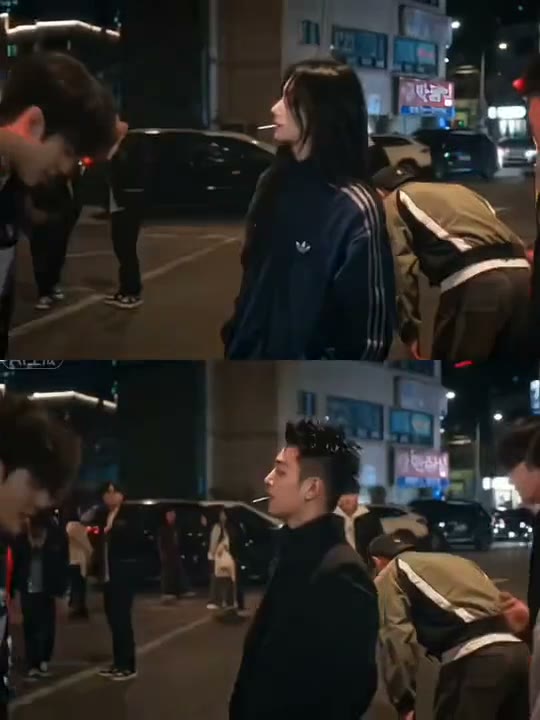
King Jin centers this adaptation on a confident nighttime portrait and a gentle approach toward the face. The reference uses vertically stacked views of a long-haired person and a short-haired person, moving from a night street to close-ups with a small stick near the mouth and finally a teal-lit entrance corridor. This King Jin AI direction uses one starting image and keeps the movement continuous, concentrating on the visible action rather than rebuilding every source edit.
Best for
- nightwear editorial posts
- profile video introductions
- understated street portraits with cinematic camera movement using King Jin AI when a still image needs a short
- focused visual story.
Create your King Jin AI video from one image
Choose your photo
Pick a waist-up portrait in dark clothing with an unobstructed face. A simple night street or softly lit doorway suits the look. Leave some space around the shoulders so the slow approach can tighten the composition without cutting into the chin. Set up your King Jin AI starting frame before choosing the motion.
Generate with the template
Select King Jin AI and guide a quiet forward gaze, a small head adjustment and a gentle camera push. Keep the action focused on this short sequence so the opening, movement and final pose each have time to read.
Review and download
Watch the eyes and jawline as the framing moves closer. Background lights should shift naturally with perspective instead of swimming across the face. Keep shoulder movement small so the camera, rather than a large gesture, carries the reveal. Review the whole King Jin AI clip once at normal speed, then pause on the busiest moment before choosing your final take.
Shape the King Jin AI motion
Use this reference direction as a starting point in custom-prompt mode. The template runs fixed instructions; remixing is a separate workflow, not an edit to the preset.
Animate the uploaded image for King Jin AI. Preserve the person’s recognizable face, hairstyle, dark clothing and night background. Move the camera gently closer from a waist-up composition while the subject makes a small composed head turn and settles into direct eye contact. Keep facial proportions, street lights and shoulder lines stable. Use one continuous shot without stacked panels, new props or location changes.
Before you create
Can King Jin AI create the stacked two-person comparison?
This preset concentrates on one subject in one nighttime setting. The reference combines two stacked portraits and several locations, while a single-image clip works as a continuous push-in. Use the resulting portrait as one panel in a separate comparison edit if that is your preferred layout.
Can I change the creative direction?
The preset uses fixed instructions. Copy the reference direction into custom-prompt mode to adapt it; this does not change the preset itself.
What video output should I expect?
The default length is 8s (reference ratio 540/720). The output follows your uploaded photo's aspect ratio and suits nightwear editorial posts, profile video introductions, understated street portraits with cinematic camera movement using King Jin AI when a still image needs a short, focused visual story..
Make your King Jin AI video
Start with a well-composed image and turn it into King Jin AI motion with a clear opening and a memorable finish.