
Upload a photo
PNG, JPG or WebP · up to 10 MB
Choose a photo to generate a video.
Expressive poses in an open studio
Turn one photo into a KDA Firestarter dance video with expressive arm lines, a playful turn and a low finishing pose. Create your studio performance on ReelAI.
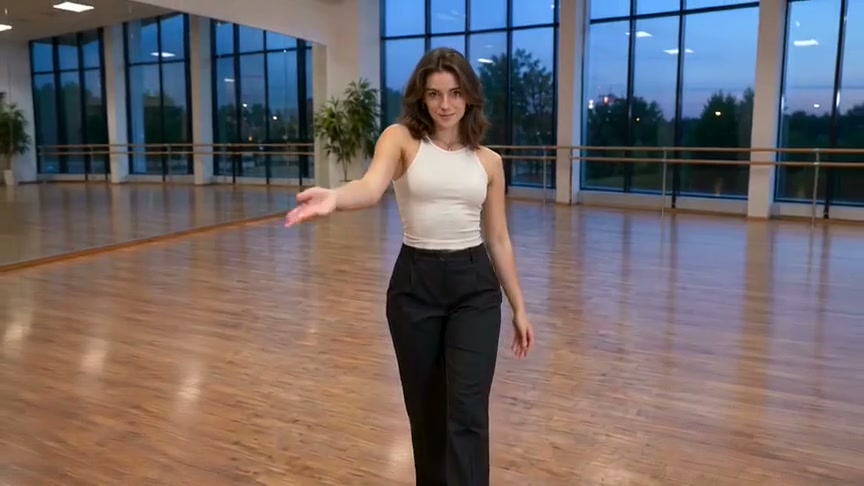
KDA Firestarter puts the emphasis on expressive hands, confident poses and a camera that moves closer to the performer. The reference shows a solo dancer in a bright, wood-floored studio at dusk: an open palm leads into a bent-knee pose, then the framing closes in for a low finish. This preset brings those visual ideas to your own portrait. A short arm flourish, a controlled turn and a balanced dip give the performance shape without asking your photo to recreate a complete music-video routine.
Best for
- Use this direction for a main-character dance
- an outfit-focused studio clip or a stylized character performance. Clean arm shapes and a readable face carry the scene. Leave enough space around the performer for the camera to approach without cropping the hands or the finishing pose.
Make your Firestarter performance
Choose your photo
Choose one clear full-body photo with the arms and legs visible. An uncluttered standing pose works better than crossed limbs or a tight selfie. Keep the face evenly lit and the outfit easy to read. A prepared dance-studio image gives more control over the floor, windows and starting composition.
Generate with the template
Keep the open-palm gesture, short turn and low finish, or adjust the studio lighting and energy around one lead performer.
Review and download
Watch the fingers as the palm turns, the knees during the dip and the face as the camera comes closer. The outfit should keep its shape and the shoes should meet the floor. Prefer a clear, balanced finish over extra gestures that crowd the short sequence.
Studio dance direction
Use this reference direction as a starting point in custom-prompt mode. The template runs fixed instructions; remixing is a separate workflow, not an edit to the preset.
Use the uploaded photo as the appearance reference for one recognizable performer. Preserve their face, hair, outfit and body proportions. Establish an open dance studio with a polished wooden floor, tall windows and soft blue dusk outside. Begin in a balanced standing pose with one open palm extended toward the camera. Continue into a compact arm flourish and a small half-turn, then lower into a controlled bent-knee finishing pose while extending one arm outward. Let the camera make one gentle move from a medium-wide view to a closer, slightly lower angle. Keep hands anatomically coherent, feet grounded and the subject's appearance stable. Use one continuous shot with no extra dancers, rapid cuts, captions, logos or specified song lyrics.
Before you create
Does KDA Firestarter need a dance reference upload?
No. This preset takes one appearance photo and supplies an editable studio-performance direction. It creates a new interpretation of the arm shapes, turn and low pose rather than transferring a dance recording. Choose the image for a recognizable face and clear body position; a particular song or beat-perfect choreography is not required for this version.
Can I change the creative direction?
The preset uses fixed instructions. Copy the reference direction into custom-prompt mode to adapt it; this does not change the preset itself.
What video output should I expect?
The default length is 12s (reference ratio 864/486). The output follows your uploaded photo's aspect ratio and suits Use this direction for a main-character dance, an outfit-focused studio clip or a stylized character performance. Clean arm shapes and a readable face carry the scene. Leave enough space around the performer for the camera to approach without cropping the hands or the finishing pose..
Put your photo on the studio floor
Start with a clear full-body photo and create a compact performance with your own face and outfit.