
Upload a photo
PNG, JPG or WebP · up to 10 MB
Choose a photo to generate a video.
One small test and a shared reaction
Upload one prepared couple photo for a Pregnancy Reveal AI video. Animate a test-in-hand surprise, a shared smile and a warm 12-second reaction together.
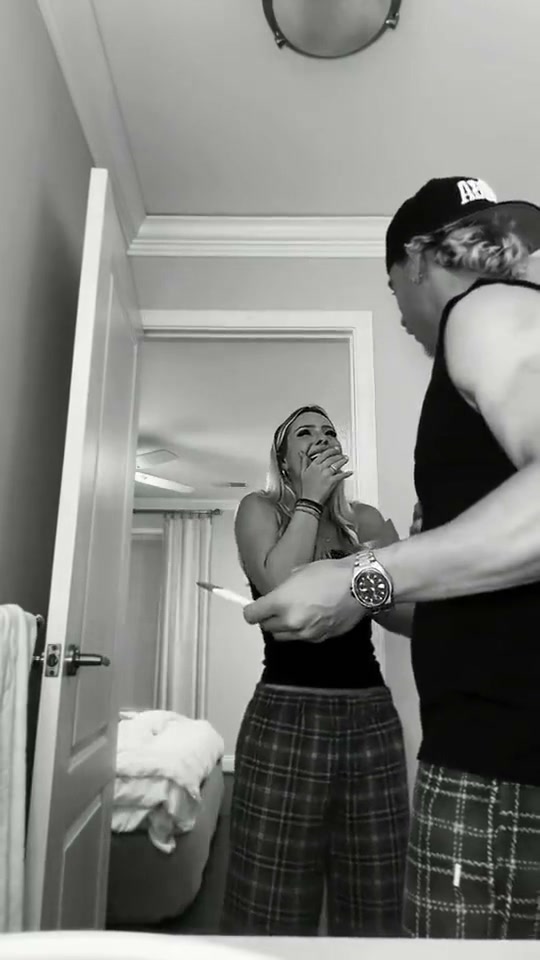
Pregnancy Reveal centers on the instant two people notice the test and react to each other. The reference is a black-and-white bedroom recording: a man holds a test near the camera while a woman covers her mouth, the couple continue reacting and the closing section cuts to an ultrasound image. The expression and hand-held prop tell the story before any extra footage appears. This Pregnancy Reveal direction keeps the two adults, the test and one shared reaction in the same composition. Prepare both people together with their faces and hands clear, then ask for a small surprised pause followed by a smile and a gentle lean toward each other.
Best for
- A couple's keepsake-style scene
- a fictional reaction vignette or a short announcement concept with an intimate indoor composition. A plain bedroom or softly lit living room leaves the expressions easy to see. Keep the prop at chest height and avoid crowding the frame with decorations. The strongest clip gives the faces and the reaction time to settle
- rather than rushing from a test to several different family scenes.
Prepare your two-person reaction photo
Choose your photo
Upload one prepared picture containing both adults side by side and a small test-shaped prop already held between them. Keep the two faces distinct, the fingers visible and the object away from either person's eyes. The existing form accepts one image, so use a couple photo or a finished two-person composition. A separate ultrasound scan is not an extra input to this preset.
Generate with the template
Keep both identities and the existing test prop in view, then guide one warm reaction without switching scenes.
Review and download
Check the shape and hand contact of the test before reviewing the expressions. Each face should stay with the same body as the couple turn toward each other. Watch for joined fingers, a third hand or a prop that grows during the reaction. Keep shoulders and arms naturally separated during the final lean. Small printed marks on the object can drift, so use the scene and expressions to carry the meaning.
Guide the surprise, smile and gentle lean
Use this reference direction as a starting point in custom-prompt mode. The template runs fixed instructions; remixing is a separate workflow, not an edit to the preset.
Animate the two adults and small test-shaped prop already present in the uploaded indoor image. Preserve each person's face, hairstyle, clothing, body proportions and position. Keep the object in the same person's hand at chest height. Both look toward the prop, pause in mild surprise, then turn toward each other with a warm smile. Add a restrained hand-to-mouth reaction only if the free hand is clearly available, followed by a small affectionate lean without changing their places. Use soft room light and a steady medium camera. Keep fingers, shoulders and the prop coherent. One continuous reaction, no new people, ultrasound insert, new lettering, readable test-result generation or rapid montage.
Before you create
Can I upload two separate portraits and an ultrasound image here?
Use one picture with the two adults already together. The Pregnancy Reveal preset animates that composition and the test-in-hand reaction. The reference's ultrasound ending is part of a longer source edit; the new direction does not combine a scan with independent identity uploads or make a multi-scene announcement montage. You can assemble additional personal footage separately after reviewing the generated couple scene.
Can I change the creative direction?
The preset uses fixed instructions. Copy the reference direction into custom-prompt mode to adapt it; this does not change the preset itself.
What video output should I expect?
The default length is 12s (reference ratio 540/960). The output follows your uploaded photo's aspect ratio and suits A couple's keepsake-style scene, a fictional reaction vignette or a short announcement concept with an intimate indoor composition. A plain bedroom or softly lit living room leaves the expressions easy to see. Keep the prop at chest height and avoid crowding the frame with decorations. The strongest clip gives the faces and the reaction time to settle, rather than rushing from a test to several different family scenes..
Create your Pregnancy Reveal reaction video
Start with one prepared couple picture and create a short, expression-led reaction around the prop already in the frame.