
Upload a photo
PNG, JPG or WebP · up to 10 MB
Choose a photo to generate a video.
One camel, a village of pairs
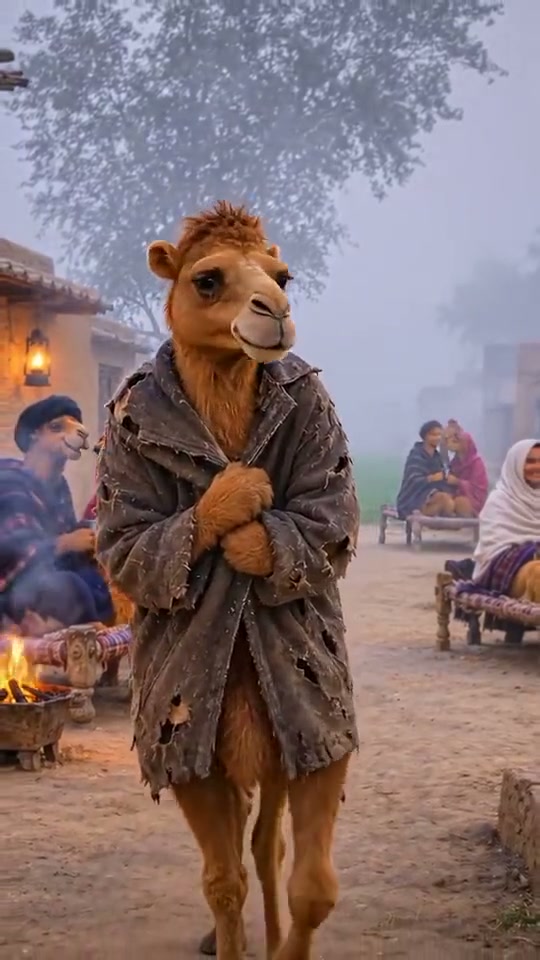
Make a Single Camel AI video from one prepared village image. Animate a shawl-wrapped camel walking alone past cozy pairs, with mist and warm firelight behind.
Single Camel follows a lonely camel character through a village full of cozy pairs. The reference shows an upright camel wrapped in a worn shawl, walking between seated couples and small fires in cold mist. Its lowered gaze supplies the final reaction. This direction animates an already prepared camel scene, keeping the slow walk and the contrast between the solitary foreground figure and warm background gatherings.
Best for
- A lonely reaction
- a winter village vignette or a gentle character-comedy post. The camel's shawl and quiet expression are central to the scene.
Prepare the shawl-wrapped character
Choose your photo
Upload one prepared image of an upright camel character wrapped in a shawl on a village path. Keep its full body, feet and shawl-holding forelimbs clear. Include any seated background pairs before uploading; an ordinary human selfie is not the required scene.
Generate with the template
Let the camel take a few short steps while holding its shawl. Keep the seated pairs, village lights and small fires quietly in the background.
Review and download
Check that the camel's muzzle, legs and shawl grip stay consistent as it approaches. Background people should remain seated and secondary, with only soft mist and fire movement.
Direct the lonely village walk
Use this reference direction as a starting point in custom-prompt mode. The template runs fixed instructions; remixing is a separate workflow, not an edit to the preset.
Animate the single upright anthropomorphic camel already present in the prepared village image. Preserve its recognizable camel head, muzzle, ears, fur, body proportions, legs and worn dark shawl, together with the existing village path and seated background pairs. The camel takes a few small grounded steps toward the camera while keeping its forelimbs clasped around the shawl at chest height. Let its head lower slightly and its gaze become quietly wistful near the end. Add soft drifting cold mist, restrained fire flicker and gentle shawl movement. Keep background people seated in their original positions. Use one slow backward-tracking camera that maintains a full-to-medium character view. No new couples, anatomy changes, human-face replacement, fast gait, song request, captions or cuts.
Before you create
Will any selfie automatically turn into the camel character?
This preset starts from a prepared camel-character image and animates it. Create the desired character and village arrangement before uploading; the preset does not add a separate portrait-to-camel image-editing step.
Can I change the creative direction?
The preset uses fixed instructions. Copy the reference direction into custom-prompt mode to adapt it; this does not change the preset itself.
What video output should I expect?
The default length is 12s (reference ratio 540/960). The output follows your uploaded photo's aspect ratio and suits A lonely reaction, a winter village vignette or a gentle character-comedy post. The camel's shawl and quiet expression are central to the scene..
Animate your Single Camel scene
Use your prepared camel scene and make the lone walk carry the whole reaction.