
Upload a photo
PNG, JPG or WebP · up to 10 MB
Choose a photo to generate a video.
A quiet farewell between two versions of yourself
Create a Goodbye 2026 Welcome 2027 AI video from a prepared farewell scene. Animate a handshake, a gentle release and a small parting step with ReelAI.
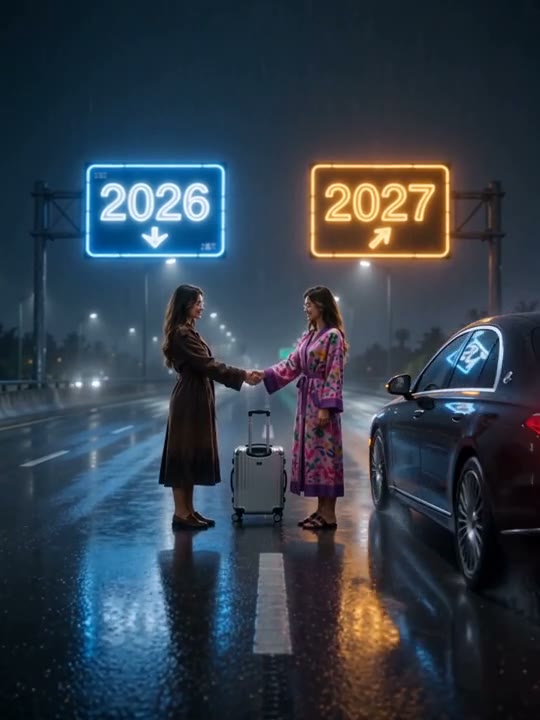
Goodbye 2026 Welcome 2027 centers on a meeting between two versions of one person at a rainy-road crossroads. The inspected references show a handshake, a figure ending up seated on the road and another leaving toward a car. This direction keeps the farewell but changes the action into a gentler standing handshake, release and small parting step. Prepare the two figures and year signs in one image first. The scene works as a personal year-end reflection or the opening of a New Year montage without attempting a long driving sequence.
Best for
- Personal year-end Reels
- New Year reflection scenes
- future-self farewells
Animate your Goodbye 2026 Welcome 2027 scene
Choose your photo
Prepare one image with both adult versions already visible beneath the intended year signs. Give their hands room to meet and keep each outfit distinct. Put the correct year lettering in the input image; two separate portrait uploads and text editing are not offered here.
Generate with the template
Add the prepared two-figure scene and select Generate video. The direction creates a brief handshake, a gentle release and one small step while rain and reflections move around the pair.
Review and download
Check that the near hands meet only once and separate naturally. Both figures should remain upright, with the same clothes and faces on their original sides. Inspect the signs for altered digits and the road reflections for sudden movement.
One handshake, a release and a small parting step
Use this reference direction as a starting point in custom-prompt mode. The template runs fixed instructions; remixing is a separate workflow, not an edit to the preset.
Animate the two adult versions already arranged beneath the year signs in the single prepared image. Keep their appearances, clothes, left-right positions and the existing 2026 and 2027 signs as visual guides. Use a fixed medium-wide camera on the rain-lit road. Both remain standing, extend their near hands into a brief handshake, look toward each other and gently release. The right-hand figure takes one small step toward the side while the left-hand figure pauses upright and gives a quiet nod. Let rain, reflected light and coat fabric move subtly. Keep any parked car stationary. Do not add or redraw year text, create a third identity, make either figure fall, open a car door, drive away, change clothing or introduce a cut.
Before you create
Does this create two versions of me from a normal selfie?
Use one prepared scene containing both versions and the year signs. This preset animates that image; it does not build the two-person composition first. The direction keeps both figures standing and does not reproduce the source fall, car departure, a self-hug or a mountain-climbing scene.
Can I change the creative direction?
The preset uses fixed instructions. Copy the reference direction into custom-prompt mode to adapt it; this does not change the preset itself.
What video output should I expect?
The default length is 7s (reference ratio 540/720). The output follows your uploaded photo's aspect ratio and suits Personal year-end Reels, New Year reflection scenes, future-self farewells.
Give your New Year farewell a moment of movement
Choose a scene with clear faces, hands and year signs. Review the handshake and lettering, then download the take that best carries your year-end mood.