
Upload a photo
PNG, JPG or WebP · up to 10 MB
Choose a photo to generate a video.
A quiet portrait opens into a wide sky escape
Upload one photo. Lift your subject into warm clouds with a widening view and gentle floating motion in a dreamy 12-second sky video. Made for a dreamy reveal.
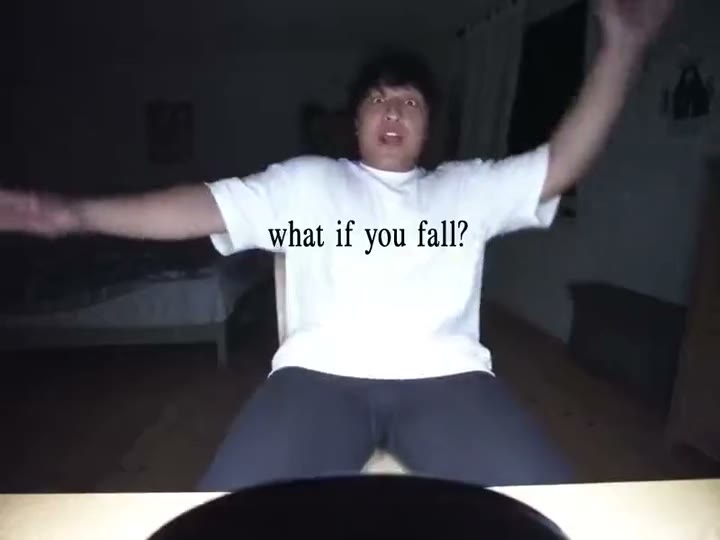
What if you fly turns a moment of hesitation into an expansive airborne reveal. The reference begins with a smiling person in a white shirt at a desk beneath a question about falling, then cuts to a small figure over sunlit water and clouds before ending on a barefoot figure against blue sky. This What If You Fly direction uses one starting image and keeps the movement continuous, concentrating on the visible action rather than rebuilding every source edit.
Best for
- personal milestone reveals
- dreamlike travel posts
- uplifting visual replies with a floating silhouette using What If You Fly when a still image needs a short
- focused visual story.
Create your What If You Fly video from one image
Choose your photo
Choose a full-body image with clear gaps between arms and torso. Leave space above the head and around both feet. A simple outdoor setting offers an easier starting point for an open-sky ascent than a tight desk crop with hidden legs. Set up your What If You Fly starting frame before choosing the motion.
Generate with the template
Select What If You Fly and guide a gentle lift, a gradual widening view and a relaxed airborne hold. Keep the action focused on this short sequence so the opening, movement and final pose each have time to read.
Review and download
Watch the ankles, hands and edges of clothing as the body rises. The figure should remain recognizable while becoming smaller within the view. Prefer a steady ascent with soft fabric movement over sudden jumps between unrelated landscapes. Review the whole What If You Fly clip once at normal speed, then pause on the busiest moment before choosing your final take.
Shape the What If You Fly motion
Use this reference direction as a starting point in custom-prompt mode. The template runs fixed instructions; remixing is a separate workflow, not an edit to the preset.
Animate the uploaded image for What If You Fly. Preserve the subject’s face, hairstyle, clothing and body proportions. Lift gently upward into a warm sunset sky, widening the camera as clouds open around the figure. Let arms float slightly apart and fabric drift softly. Keep limbs distinct and the ascent continuous; avoid sudden indoor-to-outdoor cuts, captions or additional people.
Before you create
Will What If You Fly include the desk scene and every aerial cut?
This version builds one continuous ascent from your starting image. The indoor opening and aerial shots explain the reference mood, but they are separate edits. A clear standing subject gives the generated movement room to develop without requiring an abrupt change of person or viewpoint.
Can I change the creative direction?
The preset uses fixed instructions. Copy the reference direction into custom-prompt mode to adapt it; this does not change the preset itself.
What video output should I expect?
The default length is 12s (reference ratio 720/540). The output follows your uploaded photo's aspect ratio and suits personal milestone reveals, dreamlike travel posts, uplifting visual replies with a floating silhouette using What If You Fly when a still image needs a short, focused visual story..
Make your What If You Fly video
Start with a well-composed image and turn it into What If You Fly motion with a clear opening and a memorable finish.