
Upload a photo
PNG, JPG or WebP · up to 10 MB
Choose a photo to generate a video.
A warm portrait with a little holiday movement
Turn one portrait into an AI Christmas photo to video clip. Add a cozy holiday setting, a gentle smile and a small wave for a warm, camera-facing greeting.
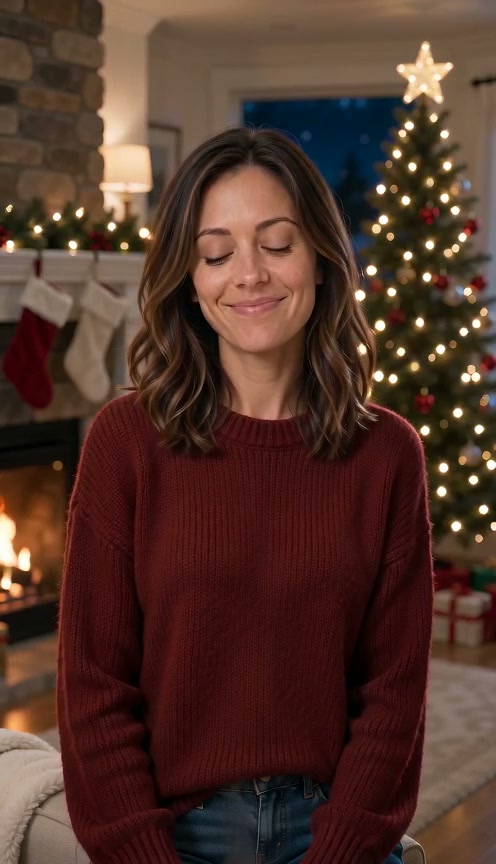
A holiday portrait can become a short greeting without a complicated performance. This Christmas Photo to Video preset uses small gestures, warm expressions and a restrained push-in so the person remains the center of the scene. The reference shows a woman in a red sweater beside a lit tree and fireplace. She raises a mug toward the camera and smiles as the shot moves closer. That third-party example is inspiration for the atmosphere, not a verified ReelAI result. Upload a clear portrait and let the prompt guide a cozy holiday setting around the person. A photo already taken beside a tree or fireplace is a closer starting point, but an ordinary portrait can also supply the subject. The direction keeps the greeting simple, with a smile and a wave rather than a scene menu or a complex performance.
Best for
- Animated holiday portraits
- personal Christmas greetings
- cozy seasonal posts
Bring a holiday greeting into motion
Choose your photo
Use one clear portrait with the person facing the camera and at least one hand visible. A photo beside a tree or fireplace follows the reference more closely. An ordinary portrait can also work as a starting point for the holiday direction. Keep the face well lit and leave space for a small wave.
Generate with the template
Upload your portrait and select Generate video. The preset guides warm Christmas surroundings, a smile and a small greeting toward the camera.
Review and download
Check that the face and clothing remain consistent as the camera moves closer. Decorations should stay anchored, and blinking lights should not turn into new objects. If the photo includes a mug, watch its rim and handle; otherwise the video should use a wave without inventing a drink.
A gentle greeting in the scene you prepared
Use this reference direction as a starting point in custom-prompt mode. The template runs fixed instructions; remixing is a separate workflow, not an edit to the preset.
Use the uploaded portrait as the visual reference for the person's recognizable face, hair and clothing. Gently establish a cozy Christmas interior with a softly lit tree and a warm hearth behind them, retaining compatible holiday details already present in the image. Keep one person centered. Begin with a natural blink and small smile, then make one gentle wave with the visible hand. If they are already holding a mug, lift that same mug slightly instead of waving. Use a restrained camera push toward the face, softly twinkling tree lights and consistent warm illumination. Keep fingers coherent and ornaments stable. No extra people, rapid makeover, exaggerated gestures, text, logos or cuts.
Before you create
Can I start with an ordinary portrait?
Yes. The prompt guides a cozy Christmas setting and gentle greeting from your portrait. An existing holiday photo gives the model a closer starting scene, but it is not required. The amount of background change and the final appearance vary with your image and selected model.
Can I change the creative direction?
The preset uses fixed instructions. Copy the reference direction into custom-prompt mode to adapt it; this does not change the preset itself.
What video output should I expect?
The default length is 8s (reference ratio 496/864). The output follows your uploaded photo's aspect ratio and suits Animated holiday portraits, personal Christmas greetings, cozy seasonal posts.
Make your Christmas portrait move
Choose a clear portrait, create a seasonal greeting and download the take you like.