
Upload a photo
PNG, JPG or WebP · up to 10 MB
Choose a photo to generate a video.
A snowy-night reveal with an eerie familiar face
Create a Polar Bear 2026 AI video from one photo. Put yourself or your pet in an eerie snowy night scene with a slow bear reveal and a curious look back.
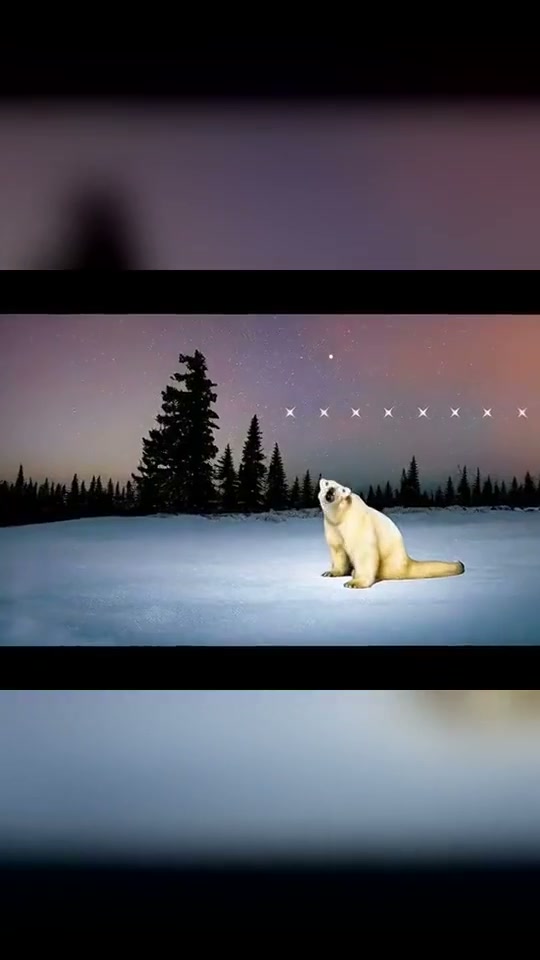
A pale bear, a snowy clearing and an almost still night are the recognizable ingredients of the Remember November look. This preset builds a short reveal around that atmosphere: your photo supplies the foreground subject, a polar bear slowly appears behind them, and a small glance back completes the moment. The inspiration preview instead shows a bear alone, first seated at a distance under a purple sky and then in a face close-up with mouth movement. It is a third-party reference, not a ReelAI result. The single-photo direction keeps the snow-night setting and eerie animal presence while choosing one clear interaction rather than recreating the original singing performance. Leave space above and beside the subject so the second silhouette can emerge without covering the face.
Best for
- Remember November edits
- eerie winter portraits
- pet-and-bear reaction clips
Put your portrait in the Remember November scene
Choose your photo
Use one front-facing portrait of a person or pet with the head and shoulders visible. Leave some empty space above the shoulders and avoid a crowded background. A prepared snowy portrait follows the setting more closely; a normal portrait can provide the subject for the scene direction.
Generate with the template
Upload one portrait and select Generate video. The direction introduces a snowy clearing and a slow bear reveal behind your subject.
Review and download
Watch the space between the foreground face and the bear. Each should stay recognizable and separate as the bear rises. Choose a take with one bear, stable fur and a small natural head turn, rather than overlapping faces, a sudden jump or a changing number of animals.
Let the bear emerge behind one still subject
Use this reference direction as a starting point in custom-prompt mode. The template runs fixed instructions; remixing is a separate workflow, not an edit to the preset.
Use the single person or pet in the uploaded image as the foreground visual reference, preserving their recognizable face, hair or fur and visible clothing. Establish a quiet snowy clearing at night, with dark pine silhouettes, a muted violet sky and soft cool light. Keep the subject seated and facing the lens, with a calm curious expression. In the open space behind one shoulder, reveal one large pale polar bear rising slowly from a low position into view. The bear gently tilts its head while the foreground subject makes a small glance back, then looks toward the lens again. Hold a mostly fixed camera with only a restrained push-in. Keep the two faces separate, the bear behind the subject and snow settled under them. No attack, chase, extra animals, character swaps, captions, logos, rapid cuts or exaggerated mouth movement.
Before you create
Does this include the original Remember November singing?
The preset guides the snowy-night look and a bear reveal from one image. It does not transfer the original singing performance or add that recording to the result. If you want a particular trend sound, add it when editing or posting the downloaded clip.
Can I change the creative direction?
The preset uses fixed instructions. Copy the reference direction into custom-prompt mode to adapt it; this does not change the preset itself.
What video output should I expect?
The default length is 12s (reference ratio 540/960). The output follows your uploaded photo's aspect ratio and suits Remember November edits, eerie winter portraits, pet-and-bear reaction clips.
Create your own snowy-night reaction
Choose a portrait with space around the shoulders, create a winter encounter and download the take you like.