
Upload a photo
PNG, JPG or WebP · up to 10 MB
Choose a photo to generate a video.
A chase with no bike beneath the rider
Create a Crazy Frog Race inspired AI video from one photo. Explore an invisible-bike pose and a futuristic road chase, then review your action clip on ReelAI.
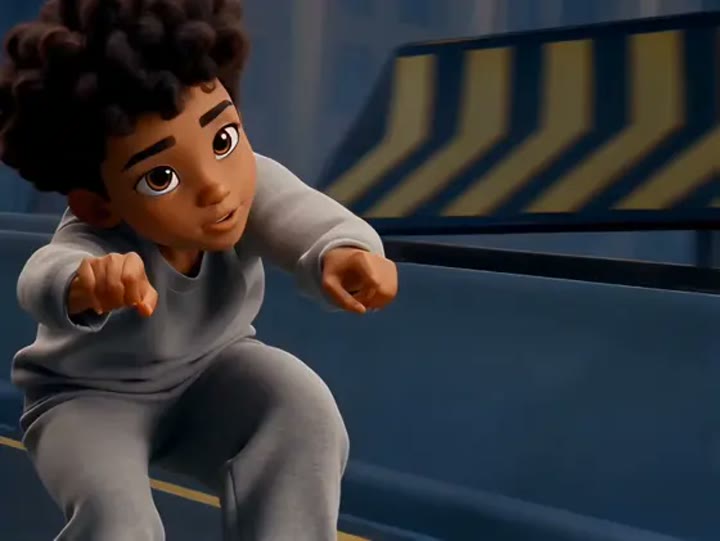
Crazy Frog Race makes the missing vehicle the joke: the subject leans forward as though gripping handlebars, yet the road is visible beneath the crouched body. This interpretation uses a low tracking view, a distant red hover vehicle, and one backward glance to suggest pursuit. It avoids a complicated stunt sequence so the unusual pose has time to register. Your photo supplies the lead character, while the roadway and background vehicle are generated around that appearance. Try it for a nostalgic chase joke, an impossible-commute edit, or a short action introduction with your own soundtrack later.
Best for
- Invisible-bike comedy
- Nostalgic chase edits
- Impossible commute jokes
Create a Crazy Frog Race interpretation
Choose your photo
A clear full-body image with visible hands and legs gives the crouching pose more information. Avoid crossed limbs or a chair covering the hips. Keep the face well lit so the backward glance has a recognizable starting point.
Generate with the template
Generate one chase clip with the prepared direction. It concentrates on a stable riding crouch and a low tracking camera, using a distant pursuer rather than a complex exchange between two foreground characters.
Review and download
Check that the model has not drawn a transparent motorcycle beneath the subject. Watch hands, knees, and the road gap during the glide. Prefer one clean tracking passage over extra stunts if the body position begins to drift.
Direct the crouch and backward glance
Use this reference direction as a starting point in custom-prompt mode. The template runs fixed instructions; remixing is a separate workflow, not an edit to the preset.
Create a surreal action-comedy shot starring the single subject from the uploaded image. Place the person in a low riding crouch with hands reaching toward imaginary handlebars and no visible vehicle underneath. Move the subject along a broad futuristic road while a small red hover vehicle remains far behind. Track from a low three-quarter side angle, add one quick backward glance, then continue forward. Preserve recognizable clothing and facial features. Keep the motion readable, omit flips and collisions, and avoid adding a frog character, text, or rapid cuts.
Before you create
Does Crazy Frog Race replace two people from separate photos?
This preset takes one image for the lead subject. The distant pursuer is a generated background element, not a second identity selected from another photo. It creates a new chase interpretation and does not copy a reference video's camera cuts, stunt timing, or soundtrack. Review the empty-air pose before using the clip.
Can I change the creative direction?
The preset uses fixed instructions. Copy the reference direction into custom-prompt mode to adapt it; this does not change the preset itself.
What video output should I expect?
The default length is 11s (reference ratio 720/542). The output follows your uploaded photo's aspect ratio and suits Invisible-bike comedy, Nostalgic chase edits, Impossible commute jokes.
Put your subject on an impossible ride
Upload a clear full-body image and explore a surreal road chase, with the invisible-bike pose and one look back carrying the comedy of the scene.