
Upload a photo
PNG, JPG or WebP · up to 10 MB
Choose a photo to generate a video.
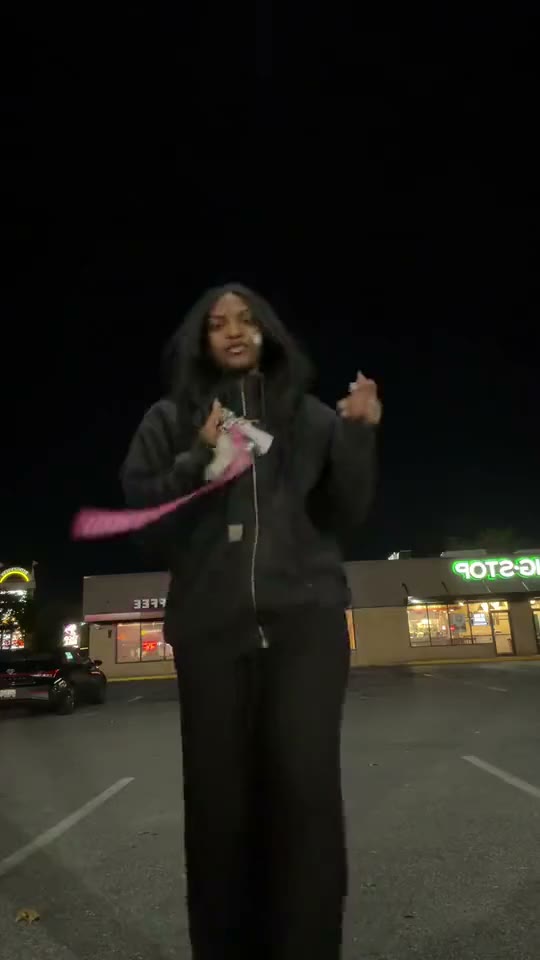
Parking-lot attitude with a wide step and backward lean
Upload one photo. Add rhythmic hand gestures, a relaxed body turn and a wide side step to your portrait in a lively 12-second dance video. Ready for a reel.
Olly Olly Dance puts the emphasis on bold gestures and a loose, confident stance. The reference shows a lead performer in a dark puffer jacket gesturing toward the lens in a nighttime parking lot, turning with a second person behind, then leaning backward into a wide stepping pose. This Olly Olly Dance direction uses one starting image and keeps the movement continuous, concentrating on the visible action rather than rebuilding every source edit.
Best for
- streetwear outfit reveals
- weekend reaction posts
- solo dance reels with relaxed nighttime energy using Olly Olly Dance when a still image needs a short
- focused visual story.
Create your Olly Olly Dance video from one image
Choose your photo
Use a full-body standing photo with visible fingers and shoes. Leave open ground on either side and headroom above the subject. Separate the hands from jacket pockets so the opening gestures have a clear shape before the torso turns. Set up your solo dance starting frame before choosing the motion.
Generate with the template
Select Olly Olly Dance and guide rhythmic hand gestures, a compact torso turn and a wide balanced side step. Keep the action focused on this short sequence so the opening, movement and final pose each have time to read.
Review and download
Check that shoes stay connected to the ground and jacket sleeves follow the arms. During the backward lean, the hips should remain balanced over the stance. Keep the face readable rather than letting a deep turn hide the entire expression. Review the whole solo dance clip once at normal speed, then pause on the busiest moment before choosing your final take.
Shape the solo dance motion
Use this reference direction as a starting point in custom-prompt mode. The template runs fixed instructions; remixing is a separate workflow, not an edit to the preset.
Animate the uploaded image for Olly Olly Dance. Preserve the dancer’s face, hairstyle, jacket and trousers. Start with relaxed rhythmic hand gestures toward the lens, turn the torso slightly, then take a wide side step with a modest backward lean. Return to a balanced stance. Keep the camera fixed at full-body distance, shoes grounded and hands distinct. Do not introduce a partner or cut away.
Before you create
Does Olly Olly Dance add the second performer from the preview?
The single-person direction follows the lead dancer only. A partner appears in the source, but the generated routine works around the person already in your image. That keeps attention on the hand rhythm, body turn and final wide stance within one fixed composition.
Can I change the creative direction?
The preset uses fixed instructions. Copy the reference direction into custom-prompt mode to adapt it; this does not change the preset itself.
What video output should I expect?
The default length is 12s (reference ratio 540/960). The output follows your uploaded photo's aspect ratio and suits streetwear outfit reveals, weekend reaction posts, solo dance reels with relaxed nighttime energy using Olly Olly Dance when a still image needs a short, focused visual story..
Make your Olly Olly Dance video
Start with a well-composed image and turn it into Olly Olly Dance motion with a clear opening and a memorable finish.