
Upload a photo
PNG, JPG or WebP · up to 10 MB
Choose a photo to generate a video.
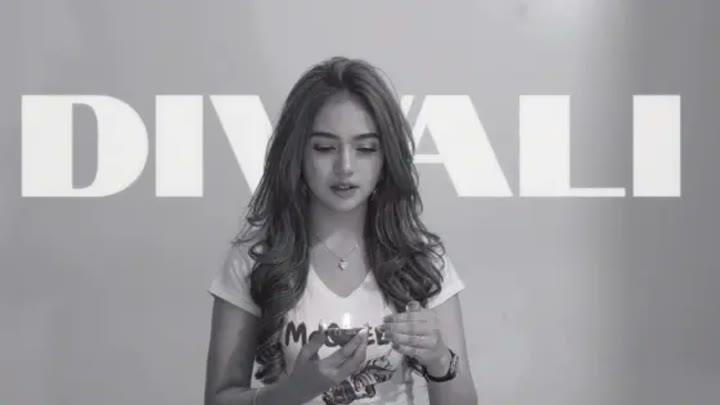
From monochrome portrait to festive color
Create a festive reveal with the Diwali AI Transformation Video Generator. Turn one portrait from black and white to warm color with a glowing diya and lights.
The Diwali AI Transformation Video Generator creates a portrait-led reveal from soft black and white to warm festive color. Your subject holds a small diya and turns gently toward the camera as rich fabric tones and golden background lights emerge. The candle-like glow provides a clear point of focus, while the slow push-in keeps attention on the face. This single-photo interpretation builds a gradual color transformation rather than matching two separately supplied before-and-after outfits. Use it for a personal Diwali greeting, a festive profile introduction or the opening of a celebration Reel.
Best for
- Diwali portrait greetings
- festive color reveals
- celebration Reel introductions
Create your Diwali light-and-color reveal
Choose your photo
Choose one well-lit waist-up portrait with a clear face and both hands visible near the torso. Keep the expression calm and the background uncluttered. Existing festive clothing can give the color reveal more specific fabric detail.
Generate with the template
Add your portrait and generate the transformation. The effect begins in monochrome, then brings warm color into the fabric and lights as your subject turns gently with a small diya held in view.
Review and download
Check that the diya remains in the same hand and that fingers do not blend into its glow. Color should arrive gradually without changing the face, while the background lamps stay softly separated from the subject.
A diya-led transformation in one shot
Use this reference direction as a starting point in custom-prompt mode. The template runs fixed instructions; remixing is a separate workflow, not an edit to the preset.
Create a festive portrait transformation using the single person in the uploaded photo. Preserve their recognizable face, hairstyle and body proportions. Begin in soft black and white with the subject holding one small glowing diya near chest height. As they gently turn toward the camera, warm color spreads across the scene, revealing rich festive fabric, golden lamps and a few softly glowing background lights. Use a slow waist-up push-in and one continuous motion. Keep the diya stable and the face central. No fireworks close to the subject, duplicate hands, copied text or abrupt identity changes.
Before you create
Can the Diwali Transformation match a specific second outfit photo?
This Diwali Transformation preset uses one portrait to create a generated monochrome-to-color reveal. It does not take a second outfit reference or guarantee an exact before-and-after garment match. The effect centers on the diya, warm light and festive fabric, while your uploaded photo guides the subject's appearance throughout the turn.
Can I change the creative direction?
The preset uses fixed instructions. Copy the reference direction into custom-prompt mode to adapt it; this does not change the preset itself.
What video output should I expect?
The default length is 12s (reference ratio 720/406). The output follows your uploaded photo's aspect ratio and suits Diwali portrait greetings, festive color reveals, celebration Reel introductions.
Make your personal Diwali greeting
Choose a clear portrait and create your festive color reveal. Review the face and diya, then download the take for a personal Diwali greeting or celebration edit.