
Upload a photo
PNG, JPG or WebP · up to 10 MB
Choose a photo to generate a video.
Tiger Transition AI: red hair reveal video
Upload one photo for Tiger Transition AI. Move a hand across the lens and reveal glossy red curls while keeping the same room in a 9-second portrait video.
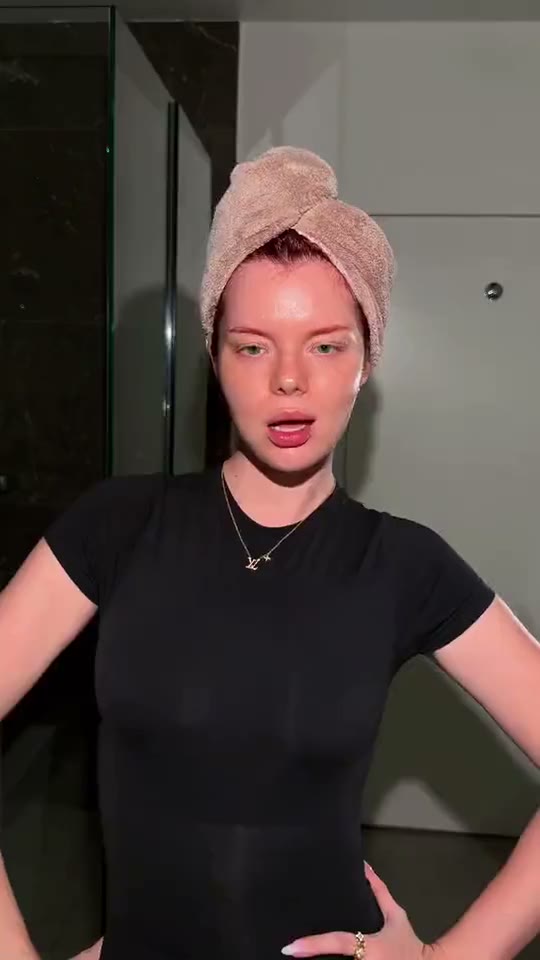
Tiger Transition AI brings a distinctive visual idea to one prepared image. A hand-over-lens makeover gives a simple portrait a dramatic finish. The reference begins with a woman in a black shirt and towel-wrapped hair, moves through a hand close to the camera and ends with long glossy red curls in the same room. No tiger appears in the sampled frames. The single-photo version concentrates on a hand passing across the lens to reveal long styled red hair in the same room. It uses the starting composition as its anchor rather than reproducing every source detail.
Best for
- Hair makeover previews
- salon inspiration posts
- personal style reveals with Tiger Transition AI. Choose a clear visual setup that communicates the joke or reveal before movement begins.
Create your Tiger Transition AI video from one image
Choose your photo
Start with a front-facing upper-body portrait showing towel-wrapped hair, a clear face and a visible hand. Leave enough room for the palm to move toward the lens without clipping the frame. For Tiger Transition AI, a carefully composed starting frame matters more than a busy backdrop. Prefer even light and clean outlines over a tight crop.
Generate with the template
Select Tiger Transition AI and guide a hand passing across the lens to reveal long styled red hair in the same room. Keep the action compact enough for a 9-second delivery. Describe the main movement first, then mention the finishing expression and any background details that should remain still.
Review and download
Inspect the fingers as the palm covers the view, then compare the eyes and jaw before and after. Curls should emerge around a stable head rather than replacing facial features. Replay the Tiger Transition AI result once at normal speed for timing, then pause around the busiest movement to check the details. Pick the take with the clearest action rather than the largest motion.
Guide the movement in Tiger Transition AI
Use this reference direction as a starting point in custom-prompt mode. The template runs fixed instructions; remixing is a separate workflow, not an edit to the preset.
Animate the prepared image for Tiger Transition AI. Guide a hand passing across the lens to reveal long styled red hair in the same room. Preserve recognizable facial features, clothing or coat markings and the initial composition. Use measured movement with a readable opening pose, a clear central action and a settled finish. Keep hands or paws distinct and maintain consistent body proportions. Inspect the fingers as the palm covers the view, then compare the eyes and jaw before and after. Curls should emerge around a stable head rather than replacing facial features. Use one continuous generated sequence rather than copying source edits. Do not add captions, watermarks or extra characters.
Before you create
Does the name mean a person becomes a tiger?
Tiger Transition AI works from a single prepared picture. The observed example is a hair makeover rather than an animal transformation. This direction follows the towel, lens-cover gesture and red-curl reveal. A single starting image guides a continuous attempt at that change; it does not supply a separate finished hairstyle photograph or guarantee an identical reveal.
Can I change the creative direction?
The preset uses fixed instructions. Copy the reference direction into custom-prompt mode to adapt it; this does not change the preset itself.
What video output should I expect?
The default length is 9s (reference ratio 540/960). The output follows your uploaded photo's aspect ratio and suits Hair makeover previews, salon inspiration posts, personal style reveals with Tiger Transition AI. Choose a clear visual setup that communicates the joke or reveal before movement begins..
Make your Tiger Transition AI video
Choose a well-composed starting image and turn it into a short Tiger Transition AI clip with a clear opening, expressive movement and a memorable finish.